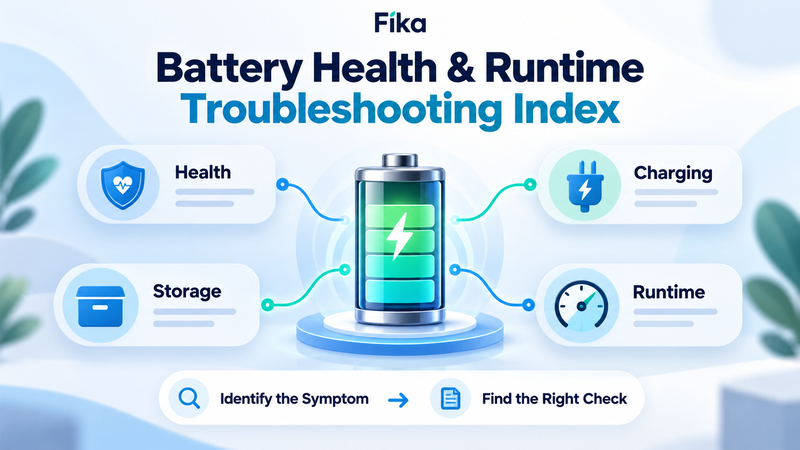
Battery Health & Runtime Troubleshooting Index
A battery that loses charge overnight, delivers less runtime than expected or shows 80% health is not necessarily failing. These symptoms can have very different explanations, from normal battery ageing and standby consumption to incorrect energy calculations or unsuitable operating conditions.
The first step in battery troubleshooting is identifying which measurement or behaviour actually needs investigation. State of Charge, State of Health, capacity retention, cycle life and runtime describe different properties. Confusing them can lead to incorrect conclusions and unnecessary battery replacement.
This troubleshooting index connects common battery problems with practical checks and more detailed guides, covering smartphones, portable power stations, electric vehicles and backup systems.
1. Battery Percentage Drops Quickly — Is It a Charge or Health Problem?
A rapidly falling battery percentage can indicate high energy consumption, reduced usable capacity, inaccurate charge estimation or other operating issues.
Start by distinguishing two measurements:
State of Charge (SoC): how much of the battery's defined charge capacity remains.
Depth of Discharge (DoD): how much of that capacity has been used.
When both use the same reference, their relationship is:
SoC + DoD = 100%.
For example, 30% SoC corresponds to 70% DoD.
But a battery displaying 30% charge is not necessarily unhealthy. It may simply have consumed 70% of its available charge.
If you are unsure how these measurements relate, start with State of Charge vs Depth of Discharge: What's the Difference?
Check next: identify whether the issue is unusual energy consumption, insufficient capacity or a potentially inaccurate charge reading.
2. Battery Health Shows 80% — Does It Need Replacing?
An 80% battery health reading often means that a capacity-based health estimate places the battery at approximately 80% of its original reference capacity.
It does not mean the battery is only 80% charged.
Consider a battery originally measured at 1,000 Wh. If its current maximum measured capacity is 800 Wh under comparable conditions, its capacity retention is approximately 80%.
That reduction may shorten runtime, but it does not automatically make the battery unusable.
Replacement depends on whether the battery still meets the application's energy and power requirements, alongside its overall condition and any manufacturer diagnostics.
For a detailed explanation, read What Does 80% Battery Health Actually Mean?
https://digitalowl.fika.bar/what-does-80-battery-health-actually-mean-01M4GFWKYY6KTCWKE5W0M3FJ4A
Check next: compare present runtime with your actual needs. Investigate unexpected shutdowns, overheating or diagnostic warnings separately from normal capacity loss.
3. Battery Has Few Cycles but Reduced Capacity — Why?
A battery can degrade even when it is rarely used.
Two ageing mechanisms help explain this:
Cycle ageing: changes associated with repeated charging and discharging.
Calendar ageing: time-dependent degradation, including periods of storage.
A battery cycled frequently may accumulate substantial cycling-related wear. Another battery stored for years can lose capacity through calendar ageing despite a low cycle count.
Temperature, storage charge, chemistry and operating conditions influence both processes.
This explains why dividing a manufacturer's cycle-life rating by daily usage does not produce a guaranteed lifespan in years.
For the complete comparison, see Cycle Life vs Calendar Life: What Ages a Battery Faster?
Check next: review the battery's age, cycling history, storage temperature and capacity-retention trend rather than evaluating cycle count alone.
4. Battery Seems to Age Faster With Fast Charging
Fast charging can increase electrochemical and thermal stress, but its effect on lifespan depends on battery chemistry, charging current, temperature, State of Charge and system design.
Modern battery systems often regulate charging power to remain within defined operating limits.
High charging current under unsuitable conditions can contribute to accelerated degradation. However, it would be misleading to claim that every fast-charging session causes a fixed percentage of battery wear.
Pay particular attention to temperature and the manufacturer's supported charging range.
For the full discussion, read Does Fast Charging Shorten Battery Life?
https://digitalowl.fika.bar/does-fast-charging-shorten-battery-life-01M54FR80MBD4018AQ1K6HHJD5
Check next: identify whether the battery operates within its approved charging conditions, whether excessive heat is present and whether a slower supported charging mode is appropriate when time is not critical.
5. Battery Is Left at 100% — Is That Harmful?
Charging a battery to its defined 100% level is different from storing it near full charge for extended periods.
For many lithium-ion batteries, prolonged exposure to high State of Charge can accelerate calendar ageing, particularly at elevated temperatures.
However, the effect varies by chemistry and product design.
A power station charged fully before an outage has a different operational priority from a battery stored unused for several months.
The most appropriate charging strategy therefore depends on storage duration, temperature, manufacturer recommendations and required readiness.
Read Is It Bad to Leave a Battery at 100% Charge?
https://digitalowl.fika.bar/is-it-bad-to-leave-a-battery-at-100-charge-01M55JPX624B3AH8X9307EMHFR
Check next: distinguish immediate-use charging from long-term storage. Follow the recommended charge level for the specific product instead of applying one universal percentage.
6. Portable Power Station Has Been Unused for Months
A portable power station may sit unused for several months without developing a fault, but stored charge can gradually decrease.
Battery cells self-discharge, and internal electronics may consume additional energy.
Calendar ageing also continues during inactivity.
The appropriate maintenance schedule depends on battery chemistry, system design, storage conditions and manufacturer instructions.
There is no reliable universal rule requiring every portable power station to be recharged after the same number of days.
The detailed storage checklist is available in How Long Can a Portable Power Station Sit Unused?
Check next: inspect the station, verify the indicated charge level, confirm suitable storage conditions and follow the manufacturer's maintenance procedure before returning it to service.
7. Power Station Loses Charge Even When Turned Off
A power station that loses charge while switched off is not necessarily defective.
Three possible explanations are:
Natural self-discharge of battery cells.
Electricity consumed by battery monitoring electronics.
Standby consumption from circuits that remain active.
Some products enter a deep-sleep mode with very low power consumption. Others may maintain additional functionality while appearing inactive.
A changing battery percentage can also reflect an updated State-of-Charge estimate rather than an exactly corresponding amount of energy loss.
For the complete explanation, see Why Portable Power Stations Lose Charge While Turned Off
Check next: confirm that outputs and unnecessary features are disabled, then compare the observed charge loss with the manufacturer's storage expectations.
8. Battery Runs Out Earlier Than the Watt-Hour Calculation Predicts
A battery runtime estimate can be inaccurate when it ignores the power station's own electrical consumption.
For example, suppose a battery system provides 500 Wh of usable energy and supports a constant 20 W appliance load.
Without additional background consumption:
500 Wh ÷ 20 W = 25 hours.
Now assume an additional 5 W of internal power consumption:
500 Wh ÷ 25 W = 20 hours.
The estimated runtime falls by five hours, even though the connected appliance and available battery energy remain unchanged.
The additional 5 W is illustrative, not a universal power station specification.
For practical examples, see How Standby Power Affects Overnight Battery Runtime
Check next: consider inverter idle consumption, conversion losses, active outputs and whether the advertised battery capacity represents usable energy.
9. Refrigerator Runtime Does Not Match the Calculation
A refrigerator compressor does not necessarily operate continuously.
Its duty cycle describes the proportion of time it runs during a defined period.
If a 100 W compressor operates for 20 minutes during each hour, its duty cycle is approximately 33%.
Ignoring off-state demand, its average power contribution would be approximately 33 W under that assumed pattern.
However, compressor activity changes with temperature, thermostat settings, door openings and other conditions.
Startup surge must also be considered separately from average energy consumption.
For the full calculation method, read Duty Cycle Explained for Battery Runtime
https://digitalowl.fika.bar/duty-cycle-explained-for-battery-runtime-01M57YPSJSF6TVTJYGDASFBGAZ
Check next: measure energy consumption over a representative period and separately confirm that the battery system can handle the appliance's starting and running power requirements.
10. How to Diagnose Battery Runtime Problems Systematically
When a battery performs differently from expectations, avoid immediately attributing the problem to capacity degradation.
Use a consistent troubleshooting sequence.
First — Establish the actual symptom. Is the battery losing charge while stored, operating for fewer hours than expected, displaying reduced health or failing to support a particular appliance?
Second — Identify the relevant measurement. Charge-level problems involve SoC. Long-term deterioration involves health and capacity retention. Runtime problems require an energy-consumption calculation.
Third — Check the operating conditions. Temperature, charging history, equipment configuration and storage practices can affect battery behaviour.
Fourth — Calculate the complete energy demand. Include appliance consumption, realistic duty cycles, conversion losses and applicable internal system consumption.
Fifth — Compare results with documented product specifications. Manufacturer ratings, operating limits and test conditions help determine whether the observed behaviour is expected.
A broader explanation of battery measurements and real-world consumption is available in the LinkedIn article Battery Runtime and Energy Consumption: From Watt-Hours to Real-World Use:
https://www.linkedin.com/pulse/battery-runtime-energy-consumption-from-watt-hours-use-zhyliaev-vsznf
This approach helps distinguish incorrect assumptions from genuine changes in battery performance.
When Should You Stop Troubleshooting and Seek Service?
Some battery problems require more than recalculating energy consumption.
Stop using the equipment and consult the manufacturer or a qualified service provider if you observe swelling, physical damage, unusual overheating, leakage, persistent electrical faults or other safety warnings.
Do not bypass battery management protections or attempt to force-charge equipment after a suspected severe discharge fault.
A reduced health percentage by itself does not necessarily indicate a safety problem, but abnormal physical or electrical behaviour must be evaluated independently.
Choosing the Right Battery Guide
Sometimes the issue is not battery health but selecting the wrong specification for the application.
For example, a system can offer substantial battery capacity but insufficient output power for an appliance.
A power station may support the required load but contain too little usable energy for the desired runtime.
Or the calculation may rely on nominal capacity without considering reserve and efficiency.
If your problem concerns selecting the right specifications rather than diagnosing an existing battery, use Battery Capacity Decision Map: Which Specification Should You Check Next?
For a broader navigation framework covering battery health, ageing and longevity, use Battery Health & Lifespan Topic Map: What to Read Next:
These resources help connect the immediate troubleshooting question with the relevant underlying battery specification.
Final Battery Health & Runtime Troubleshooting Checklist
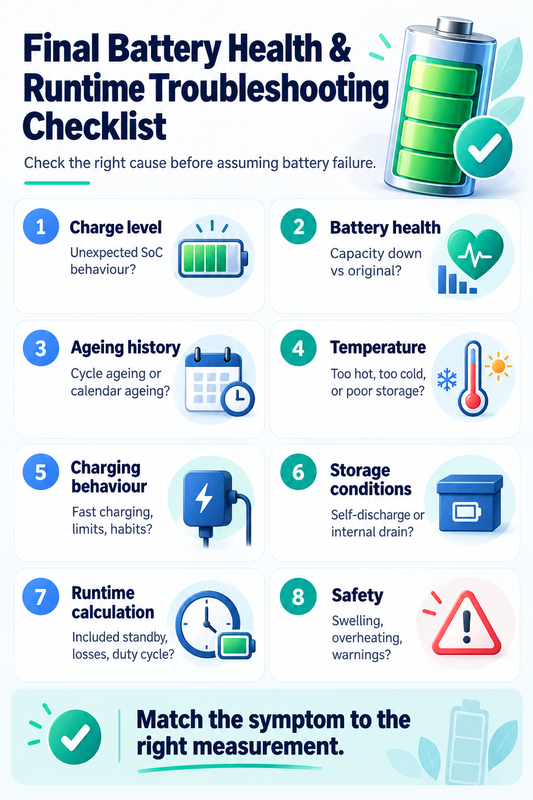
Before deciding that a battery is failing, establish:
Charge level: is the reported SoC behaving unexpectedly?
Battery health: has maximum capacity declined relative to its reference?
Ageing history: could cycle ageing or calendar ageing explain the change?
Temperature: has the battery operated or remained stored outside suitable conditions?
Charging behaviour: are charging rates and charge limits appropriate?
Storage conditions: could self-discharge or internal electronics account for charge loss?
Runtime calculation: have standby consumption, conversion losses and duty cycles been included?
Safety: are there physical, thermal or diagnostic warning signs?
The central troubleshooting principle is to match the symptom to the correct measurement before choosing a solution.
A battery losing charge while switched off, a battery showing 80% health and a refrigerator running for fewer hours than expected may involve entirely different mechanisms.
Understanding those differences helps avoid unnecessary battery replacement, unrealistic runtime estimates and unsuitable charging or storage decisions.
Comments
No comments yet. Be the first to comment!