How to Size Battery Capacity for Multiple Devices
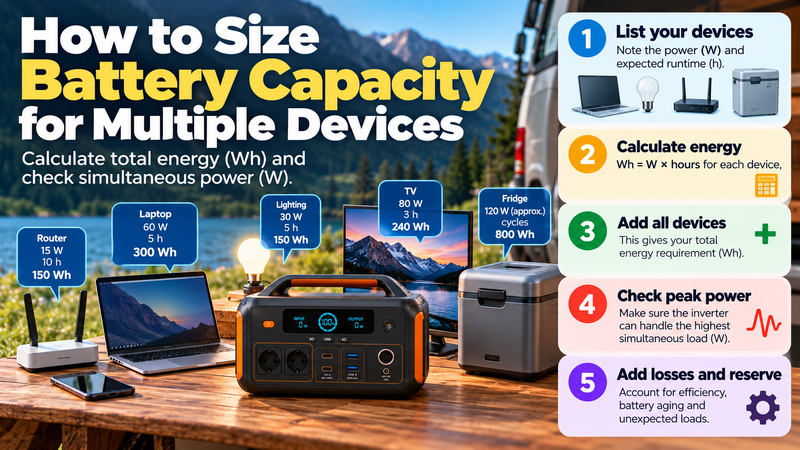
Sizing a battery for one device is relatively simple. Sizing for several devices is harder because you must answer two different questions at the same time: how much power might the devices need simultaneously, and how much energy will they consume over the full operating period?
Those are not the same calculation.
A system can have enough battery capacity in Wh but still fail because the inverter cannot support the combined load. It can also have enough inverter power while running out of stored energy too quickly.
The safest approach is to calculate simultaneous watts and cumulative watt-hours separately.
For the broader battery-capacity framework:
https://medium.com/@volodymyrzh/battery-capacity-explained-mah-wh-amp-hours-decoded-1dc676be5a38
Start With a Device List
Begin by listing every device you expect the battery system to support.
For each one, record:
running power in watts;
expected runtime;
whether it operates continuously or intermittently;
startup or surge power if relevant.
For example, a small backup setup might include:router: 15 W;
laptop: 60 W;
LED lighting: 30 W;
television: 80 W;
refrigerator: 120 W while the compressor is running.
This list gives you the inputs for both the power and energy calculations.
First Calculate Energy for Each Device
For each load:
Energy (Wh) = Power (W) × Runtime (h)
Suppose the estimated use is:
Router:
15 W × 10 h = 150 Wh
Laptop:
60 W × 5 h = 300 Wh
Lighting:
30 W × 5 h = 150 Wh
Television:
80 W × 3 h = 240 Wh
Refrigerator:
assume approximately 800 Wh over the backup period based on realistic cycling rather than multiplying compressor wattage by every hour.
Now add the energy values:
150 + 300 + 150 + 240 + 800 = 1,640 Wh
That is your estimated cumulative load energy.
For the underlying runtime calculation:
https://digitalowl.fika.bar/battery-runtime-formula-01M2JVJ0DBC2706XRP728QTZQ3
Do Not Add Runtime Hours Together
This is a common mistake.
If one device runs for five hours and another runs for eight hours, the system does not necessarily operate for thirteen hours.
The devices may run at the same time.
Battery energy is calculated separately for each load, then the Wh values are added together.
So:
Device A Wh + Device B Wh + Device C Wh = Total required energy
This is different from adding all operating hours and multiplying by one combined wattage.
Then Calculate Simultaneous Power
Now ask:
Which devices may operate at the same moment?
Suppose the router, laptop, lights, television and refrigerator compressor are all active together:
15 W + 60 W + 30 W + 80 W + 120 W =
305 W
The inverter or power station should be able to support at least this continuous load.
But this is still not the full answer because some devices can briefly require more power at startup.
Continuous Power and Energy Capacity Solve Different Problems
A battery system may have:
2,000 Wh capacity
and:
300 W inverter output
It may contain enough stored energy for your daily requirement but fail when several devices operate together.
Another system may have:
1,000 Wh capacity
and:
2,000 W inverter output
It can support a much larger instantaneous load but may run out of energy sooner.
This is why multi-device sizing always needs two checks:
Total Wh → how long the system can support the loads.
Total W → whether the system can support them simultaneously.
Startup Surges Need a Separate Check
Motor-driven appliances can briefly draw more power when starting.
Examples include:
refrigerators;
pumps;
compressors;
some power tools;
certain air-conditioning systems.
Suppose your normal combined load is 305 W, but the refrigerator briefly requires several hundred additional watts during compressor startup.
The battery may have enough stored energy, but the inverter must still tolerate that short peak.
Do not add surge watts permanently to the energy calculation.
Surge is mainly a power capability question, not continuous energy consumption.
A Worked Multi-Device Example
Imagine you want to run four loads:
router: 15 W for 12 hours;
laptop: 65 W for 6 hours;
lights: 40 W for 5 hours;
refrigerator: estimated 900 Wh for the same period.
Calculate the first three:
Router:
15 × 12 = 180 Wh
Laptop:
65 × 6 = 390 Wh
Lighting:
40 × 5 = 200 Wh
Add the refrigerator:
180 + 390 + 200 + 900 = 1,670 Wh
So the estimated load energy is:
1.67 kWh
But that is not yet the battery size you should buy.
Adjust for Real-World Losses
The battery must usually provide more energy than the devices themselves consume.
Losses can come from:
inverter conversion;
DC conversion;
standby power;
internal electronics;
battery-management limits.
If your loads require 1,670 Wh and you assume an effective system efficiency of 85%:
1,670 ÷ 0.85 ≈ 1,965 Wh
Your battery would therefore need around 1.97 kWh of nominal energy just to cover the estimated load under that simplified efficiency assumption.
That is before any additional reserve margin.
Add Reserve After the Core Calculation
Once the usable-energy requirement is estimated, consider uncertainty.
Possible reasons for extra reserve include:
loads running longer than expected;
battery aging;
temperature;
additional devices;
uncertain recharge availability.
If the adjusted requirement is 1,965 Wh and you decide on a 20% reserve:
1,965 × 1.20 ≈ 2,358 Wh
A target near 2.4 kWh would provide more flexibility than designing around the exact minimum.
The reserve should reflect uncertainty rather than follow one universal percentage.
Intermittent Loads Should Not Be Treated as Continuous
Refrigerators, pumps and thermostatically controlled devices often cycle.
If a refrigerator draws 120 W while running, that does not mean:
120 W × 24 hours = 2,880 Wh
unless the compressor actually operates continuously for 24 hours.
A realistic estimate should use measured energy consumption, a known daily Wh figure or a reasonable duty-cycle assumption.
The same principle applies to any device that switches on and off automatically.
Different Devices May Use Different Power Paths
Not every load uses the same output.
You might run:
refrigerator from AC;
laptop from USB-C;
router from DC;
phone from USB.
Different conversion paths can have different efficiency.
For rough planning, one conservative system-level efficiency estimate may be sufficient.
For more precise sizing, calculate different loads separately when their power paths differ significantly.
Prioritise Loads Before Increasing Capacity
If the calculated battery becomes much larger than expected, do not immediately assume you need a bigger system.
First ask whether every load must operate for the full period.
For example:
router may be critical;
refrigerator may be critical;
lights may be limited;
laptop runtime may be reduced;
television may be optional.
Reducing discretionary loads can often save more capacity than changing battery technology.
Home Backup Uses the Same Logic at a Larger Scale
The same method applies whether you are sizing for four portable devices or a larger home-backup system.
The difference is scale.
Home backup may include:
refrigeration;
networking;
lighting;
furnace blower;
pumps;
computers;
medical or site-specific equipment.
Each load still needs a wattage and runtime estimate.
Then the energy values are combined.
For the broader home-backup workflow:
https://digitalowl.fika.bar/how-much-battery-capacity-do-you-need-for-home-backup-01M41CTYZGP56F26YBTXNACTW5
Start With One Device if the System Is Still Unclear
If multi-device sizing feels complicated, first understand the single-device calculation.
The basic sequence is:
Device watts × required hours → Wh
Then adjust for usable capacity, efficiency and reserve.
A dedicated single-device guide is available here:
https://digitalowl.fika.bar/how-much-battery-capacity-does-a-device-need-01M2JVYX8GC5RDZQS859RWT5XB
Multi-device sizing simply repeats that process for each load and then combines the results.
Real Loads Can Change the Final Answer
Specification-sheet wattage is useful, but real devices do not always behave like simple fixed loads.
Startup surges, cycling, variable processor loads, conversion losses and high-load behaviour can change practical results.
That is why the final battery decision should be based on the actual load profile rather than capacity alone.
A broader explanation of how real-world loads change storage sizing:
https://www.linkedin.com/pulse/how-real-world-loads-change-battery-storage-sizing-volodymyr-zhyliaev-odgdf/
A Practical Multi-Device Sizing Workflow
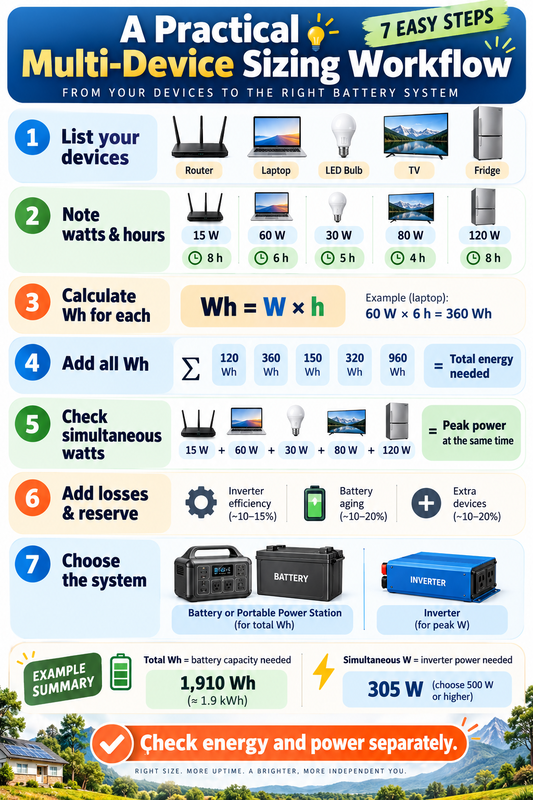
Use this sequence:
List every device.
Record its running watts.
Estimate realistic runtime.
Calculate Wh for each device.
Add all Wh values to get total energy.
Calculate the highest likely simultaneous wattage.
Check startup surge where relevant.
Adjust energy for system efficiency.
Add a justified reserve margin.
Verify recharge options before finalising capacity.
This keeps power and energy from being mixed together.
The Practical Rule
For multiple devices, calculate energy per device first, then add the Wh values.
Separately calculate how many watts may be required at the same time.
Think of the two numbers this way:
Total Wh = how much battery you need.
Simultaneous W = how powerful the system must be.
Only when both are checked together can you size a multi-device battery system realistically.
Comments
No comments yet. Be the first to comment!