How Much Battery Capacity Does a Device Need?
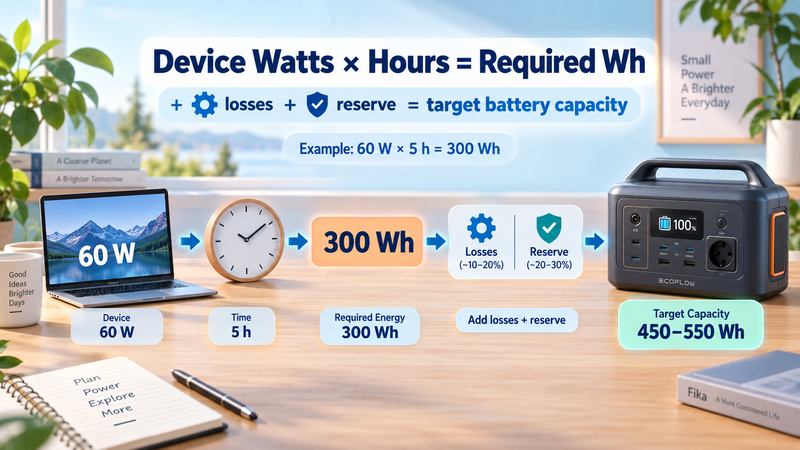
Choosing a battery for a device becomes much easier when you stop thinking in vague labels such as “large battery” or “high capacity” and calculate the energy the device actually needs. For most everyday sizing questions, you need only two starting numbers: the device’s average power consumption in watts and the number of hours you want it to run.
The basic relationship comes directly from watt-hours. If you want a broader explanation of mAh, Ah, Wh and the specifications used to describe battery capacity, see the complete guide here: https://medium.com/@volodymyrzh/battery-capacity-explained-mah-wh-amp-hours-decoded-1dc676be5a38
Start With Watts and Required Runtime
The first calculation is:
Required energy (Wh) = Average power (W) × Runtime (hours)
Suppose a device consumes an average of 60 W and you want it to operate for 5 hours:
60 W × 5 h = 300 Wh
In an ideal system, you would therefore need 300 Wh of energy. This is the theoretical minimum, not necessarily the battery size you should actually buy.
The same approach works for almost any single device as long as you have a useful estimate of its average power consumption. A 20 W router running for 10 hours requires 200 Wh, while a 100 W television running for 4 hours requires 400 Wh.
Battery Sizing Is the Reverse of Runtime Calculation
Battery runtime and battery sizing use the same relationship from opposite directions.
To estimate runtime, you divide battery energy by the load:
Runtime = Battery capacity (Wh) ÷ Load (W)
To estimate the capacity needed for a target runtime, you reverse the calculation:
Required energy = Load (W) × Runtime (h)
The battery runtime formula is explained in more detail here: https://digitalowl.fika.bar/battery-runtime-formula-01M2JVJ0DBC2706XRP728QTZQ3
This distinction is useful because the question changes from “How long will this battery last?” to “How large must the battery be to reach the runtime I need?”
For example, if a 75 W device must operate for 8 hours:
75 W × 8 h = 600 Wh
Your starting target is therefore 600 Wh of delivered energy.
Account for Usable Capacity and Conversion Losses
Real batteries rarely deliver every watt-hour printed on the label to the connected device. Some capacity may be reserved by the battery-management system, while additional energy may be lost during DC-to-AC conversion or other parts of the power path.
That is why rated capacity and usable capacity are different concepts. You can read the detailed explanation here: https://digitalowl.fika.bar/rated-capacity-vs-usable-capacity-what-s-the-difference-01M2GQ5Y5KA68T9JHJQKWPD6TE
A more practical sizing formula is:
Required rated capacity = Required load energy ÷ Usable fraction ÷ Efficiency
Imagine a device that needs 360 Wh of energy. Assume, purely for this example, that 90% of the battery's rated capacity is usable and that the relevant power-conversion path is 90% efficient.
First account for usable capacity:
360 Wh ÷ 0.90 = 400 Wh
Then account for conversion efficiency:
400 Wh ÷ 0.90 ≈ 444 Wh
Under those assumptions, a battery rated at only 360 Wh would be too small. The mathematical minimum would be approximately 444 Wh.
The percentages here are illustrative rather than universal. If a manufacturer already provides a measured usable-output figure, do not automatically subtract the same losses again.
Add a Sensible Reserve Instead of Sizing to the Exact Limit
Sizing a battery to the exact calculated minimum leaves very little room for changes in power consumption, colder conditions, battery ageing or a longer-than-planned operating period. A practical system therefore often benefits from some reserve capacity.
Suppose your calculation produces a minimum requirement of 444 Wh. Adding a 20% planning reserve gives:
444 Wh × 1.20 ≈ 533 Wh
You would therefore look for a battery somewhere above roughly 530 Wh, rather than treating 444 Wh as a perfect target.
A useful sizing workflow is:
Find the device's realistic average consumption in watts.
Decide how many hours it must operate.
Multiply watts by hours to get the required Wh.
Adjust for usable capacity where necessary.
Account for conversion efficiency only if it has not already been included.
Add a reasonable reserve for real-world variation.
Choose a battery with rated capacity at or above the resulting target.
The reserve is a planning choice rather than a universal percentage. A device used occasionally may justify less margin, while critical backup equipment may deserve significantly more.
Example: Sizing a Battery for a Laptop
Imagine a laptop that averages 45 W during the type of work you normally do, and you want 8 hours of battery-powered operation.
First calculate the load energy:
45 W × 8 h = 360 Wh
Now assume the battery provides 90% usable capacity and the complete power path is approximately 90% efficient:
360 Wh ÷ 0.90 ÷ 0.90 ≈ 444 Wh
Then add a 20% planning reserve:
444 Wh × 1.20 ≈ 533 Wh
A practical target would therefore be a battery rated at roughly 550 Wh or more under those assumptions.
This does not mean every 550 Wh battery is automatically suitable. Battery capacity tells you how much energy is available, but you still need to confirm that the power source can safely supply the device's required wattage and that the necessary output connection is supported.
The Simple Rule to Remember
For a quick estimate, start with:
Device watts × required hours = required watt-hours
Then move from theoretical energy to a realistic battery size by considering usable capacity, conversion losses and an appropriate reserve.
The key is to size the battery around the energy the device will actually consume, not around a capacity number that merely looks large on a specification sheet. Once watts and runtime are known, the battery-capacity requirement becomes a measurable calculation rather than a guess.
Comments
No comments yet. Be the first to comment!