How Much Battery Capacity Does Starlink Need During an Outage?
How Much Battery Capacity Does Starlink Need During an Outage?
Starlink can provide internet connectivity when conventional wired networks are unavailable, but the terminal, router and power supply still require electricity. During a power outage, a portable power station or backup battery can keep the system operating if it delivers sufficient energy and compatible electrical power.
The battery capacity required depends on the Starlink model, actual power consumption, backup duration, additional networking equipment and conversion losses. A Starlink Mini can have substantially different energy requirements from a Standard or Performance system.
The practical approach is to calculate the complete connectivity load in watt-hours (Wh), account for the battery system's usable energy and include an appropriate reserve.
How Much Power Does Starlink Actually Use?
According to Starlink's official power-consumption guidance, typical consumption differs across hardware generations.
Starlink Mini: approximately 20–40W average, with around 15W at idle.
Starlink Standard Actuated: approximately 50–75W average.
Starlink Standard 4 / Standard 4 X: approximately 75–100W average.
Starlink V5: approximately 35–50W average according to Starlink's model comparison.
Starlink Performance (Gen 1 and Gen 2): approximately 110–150W average.
These are manufacturer-reported typical ranges, not guaranteed continuous consumption.
Starlink notes that its published system consumption figures include the terminal, Wi-Fi router, power supply and cables. This is important: do not automatically add another router's power consumption if that router is already included in the reported system figure.
Power usage varies with environmental conditions, system activity and hardware configuration.
Official manufacturer information:
https://starlink.com/us/support/article/18836c7e-2d97-6153-fe67-c18427bd0558
https://starlink.com/gd/support/article/5465736f-fa8d-3ac1-dd3a-7a259d12fa8d
For a precise backup calculation, identify the hardware version first and use measured consumption where possible.
Step 1: Calculate Starlink Energy Consumption in Wh
The basic formula is:
Energy Required (Wh) = Average Power (W) × Operating Time (hours)
Consider two illustrative scenarios based on values within Starlink's published consumption ranges.
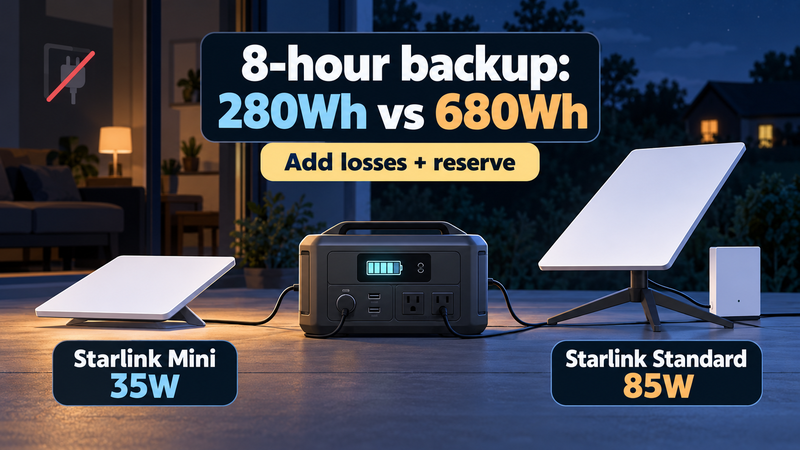
Scenario A — Starlink Mini averaging 35W
8 hours: 35 × 8 = 280Wh.
12 hours: 35 × 12 = 420Wh.
24 hours: 35 × 24 = 840Wh.
Scenario B — Starlink Standard averaging 85W
8 hours: 85 × 8 = 680Wh.
12 hours: 85 × 12 = 1,020Wh.
24 hours: 85 × 24 = 2,040Wh.
The Standard system in this comparison requires approximately 2.4 times as much energy as the Mini under the chosen assumptions.
These values describe Starlink system energy consumption at the modelled input, before additional backup-battery conversion losses.
Real power use can vary during the outage.
Step 2: Add Battery Conversion Losses and Reserve
A portable power station may convert stored DC electricity into AC electricity to operate Starlink's power adapter.
This introduces conversion losses.
Battery operating limits and other system consumption can further affect how much energy is available.
A simplified sizing formula is:
Required Nominal Battery Capacity = Energy Demand ÷ Delivery Factor × Reserve Factor
Suppose an illustrative backup system has:
Battery-to-load delivery factor: 85%.
Additional planning margin: 20%.
Reserve factor: 1.20.
For the Starlink Mini using 280Wh over eight hours:
280 ÷ 0.85 × 1.20 ≈ 395Wh.
For the Standard system using 680Wh:
680 ÷ 0.85 × 1.20 = 960Wh.
The same assumptions produce the following planning targets.
Starlink Mini, 35W average
8 hours: approximately 395Wh.
12 hours: approximately 593Wh.
24 hours: approximately 1,186Wh.
Starlink Standard, 85W average
8 hours: approximately 960Wh.
12 hours: approximately 1,440Wh.
24 hours: approximately 2,880Wh.
These are nominal planning estimates, not guaranteed product runtimes.
The assumed 85% delivery factor and 20% margin should be replaced with more accurate system-specific data when available.
For the underlying method, see Battery Runtime Formula:
https://digitalowl.fika.bar/battery-runtime-formula-01M2JVJ0DBC2706XRP728QTZQ3
Step 3: Include Additional Networking Equipment
Starlink may be only one component of a home or field connectivity setup.
Other equipment can include:
A separate Wi-Fi router.
An Ethernet switch.
A firewall or network controller.
Additional access points.
A device used for communications or remote work.
These loads consume energy too.
For example, consider a Starlink Standard system averaging 85W, plus a separate Ethernet switch consuming 10W and an additional access point consuming 5W.
The total average demand is:
85W + 10W + 5W = 100W.
For an eight-hour outage:
100W × 8h = 800Wh.
With the illustrative delivery factor and reserve:
800 ÷ 0.85 × 1.20 ≈ 1,129Wh.
The planning requirement therefore increases from approximately 960Wh for Starlink alone to 1,129Wh for the larger configuration.
Be careful not to double-count an integrated or included Starlink router.
For a detailed combined-load calculation, read How to Size Battery Capacity for Multiple Devices:
Step 4: Can a 1,000Wh Power Station Run Starlink Overnight?
Potentially, yes. The result depends on the particular Starlink model and power station.
Suppose a portable power station stores a nominal 1,000Wh and delivers an illustrative 85% of that energy to the connected system.
Available delivered energy:
1,000Wh × 0.85 = 850Wh.
For a Starlink Mini averaging 35W:
850 ÷ 35 ≈ 24.3 hours.
For a Starlink Standard system averaging 85W:
850 ÷ 85 = 10 hours.
These estimates exclude any separately reserved energy and assume the average loads remain constant.
If 20% of the 850Wh delivered-energy budget is deliberately set aside, only 680Wh remains available for planned consumption.
The corresponding estimates become:
Mini at 35W: approximately 19.4 hours.
Standard at 85W: approximately 8 hours.
This illustrates how reserve assumptions influence runtime.
The calculations should not be interpreted as product-specific performance guarantees.
Step 5: AC vs DC Power for Starlink Mini
Some Starlink models offer supported DC powering options.
For example, official Starlink Mini guidance describes DC power support and a manufacturer-specified USB Power Delivery arrangement using an appropriate accessory.
Starlink's instructions identify a 100W USB-C PD supply at 20V/5A for its compatible USB-C-to-barrel-jack cable arrangement.
This does not mean the Mini continuously consumes 100W. The USB-C power-source rating describes the source capability required for supported operation.
Manufacturer guidance:
https://starlink.com/us/support/article/a7fe6525-5356-a837-48e6-33df176cdbc5
A suitable direct-DC setup may avoid some AC conversion losses.
However, DC operation does not guarantee longer runtime in every configuration. Cable losses, voltage conversion, connector compatibility and output efficiency still matter.
Use manufacturer-approved power accessories and verify the input requirements of the exact hardware version.
Do not assume that any USB-C output or generic DC cable can safely power Starlink.
Step 6: Why Starlink Power Consumption Can Change
A Starlink system's power demand is not necessarily constant.
Several factors may influence consumption:
Data transmission and reception activity.
Hardware generation.
Environmental temperature.
Heating or snow-melting functions where available.
Power supply and connected equipment.
Operating configuration.
A system may consume more energy under demanding conditions than during an ordinary indoor test.
For this reason, selecting a battery based only on the lowest observed wattage can produce an overly optimistic runtime estimate.
If Starlink must remain operational during winter weather or an extended emergency, the battery plan should account for realistic higher-consumption conditions.
The manufacturer's current specifications and suitable measurements should guide the calculation.
Step 7: Plan a Complete Home-Office Backup
Starlink alone may preserve an internet connection, but a functional home office also needs power for connected devices.
Consider an illustrative eight-hour work period:
Starlink Standard system: 85W × 8h = 680Wh.
Laptop: 45W × 5h = 225Wh.
External monitor: 25W × 5h = 125Wh.
Separate network switch: 10W × 8h = 80Wh.
Combined energy:
680 + 225 + 125 + 80 = 1,110Wh.
Using the illustrative 85% delivery factor and 20% planning margin:
1,110 ÷ 0.85 × 1.20 ≈ 1,567Wh.
Under these assumptions, a nominal battery capacity of approximately 1.6kWh reaches the calculated planning target.
The complete setup may require a larger battery than Starlink alone, even if the satellite terminal is the most important device.
A broader calculation workflow is covered in How Much Battery Capacity Does a Home Office Need?
Step 8: Consider Transfer Time and Automatic Shutdown
A power station with enough stored energy is not automatically an uninterrupted power supply.
Some portable systems require manual intervention when grid electricity fails. Others provide backup switching, but the transfer time and behaviour vary.
If the power source changes, Starlink and the router may restart.
That can interrupt an active call, remote connection or other network session.
Before relying on the equipment, check whether the power station provides the required switching behaviour.
Also verify that its output remains active at Starlink's operating load. Some stations have automatic low-load shutdown functions that may not suit the intended setup.
Battery runtime and continuity of service are separate requirements.
A backup arrangement should be evaluated for both.
How to Measure Starlink's Real Energy Use
If possible, observe actual power consumption using compatible metering equipment.
A practical assessment includes:
Identify the exact Starlink hardware version.
Check its current manufacturer specifications.
Measure energy consumption during representative operation.
Include any separately powered network equipment.
Record energy use over a sufficiently long period.
Recalculate requirements for the intended outage duration.
Add appropriate reserve.
Test the complete backup arrangement safely.
For example, a Starlink configuration consuming 720Wh over twelve hours has an average demand of:
720Wh ÷ 12h = 60W.
That measured average can replace a generic estimate when calculating runtime for the same configuration under comparable conditions.
However, reserve should still account for changes in operating conditions.
Common Starlink Battery-Sizing Mistakes
Mistake 1: Using One Wattage for Every Starlink Model
Mini, Standard, Performance and newer hardware generations have different energy requirements.
Mistake 2: Ignoring the Router and Network Equipment
The manufacturer's standard consumption figures may already include the supplied router, but external switches, additional access points and other separately powered equipment must be included.
Mistake 3: Assuming Nominal Battery Capacity Is Fully Available
Battery operating limits and conversion losses affect delivered energy.
Mistake 4: Confusing Power Supply Rating With Average Consumption
A 100W-capable power supply does not mean the connected Starlink device continuously uses 100W.
Mistake 5: Ignoring Backup Switching Behaviour
A power station may provide enough energy but still allow an interruption during the transition from grid electricity.
Final Starlink Backup Battery Checklist
Before selecting a battery or portable power station, confirm:
Starlink model: Mini, Standard, Performance or another hardware generation?
Actual power: what average consumption should be expected?
Backup duration: eight, twelve, twenty-four hours or longer?
Additional equipment: which separately powered devices must stay online?
Usable energy: how much battery capacity reaches the connected equipment?
Reserve: how much uncertainty should the plan accommodate?
Electrical compatibility: are voltage, connectors and output characteristics correct?
Transfer behaviour: will the system restart when utility electricity fails?
Recharging: how will the backup battery be replenished during an extended outage?
Final Takeaway
Starlink backup capacity depends on the exact hardware version, its actual energy consumption and the duration of the power outage.
Under illustrative operating assumptions, a Starlink Mini averaging 35W consumes 280Wh over eight hours, while a Standard system averaging 85W consumes 680Wh.
With an 85% battery-to-load delivery factor and a 20% planning margin, the corresponding nominal battery targets are approximately 395Wh and 960Wh.
Additional network equipment and longer outages can increase these requirements significantly.
The practical rule is simple: identify the Starlink model, calculate the complete connectivity energy budget, account for system losses and choose a compatible battery with adequate reserve.
Comments
No comments yet. Be the first to comment!