How Much Battery Capacity Does a Home Office Need?
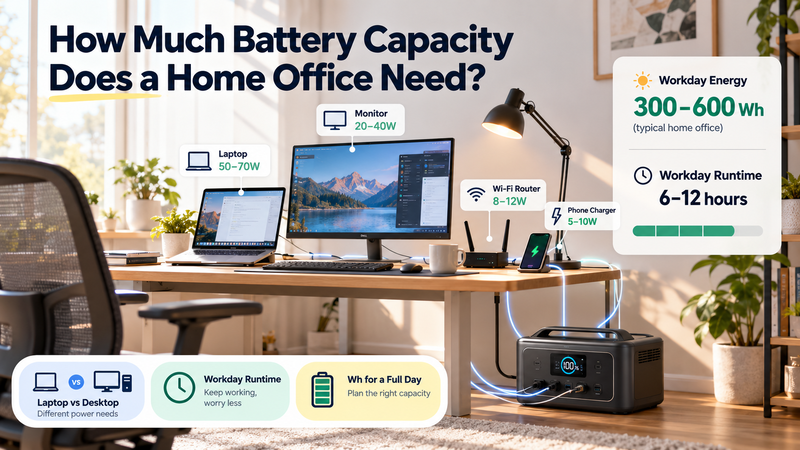
A home office looks simple from a backup-power perspective.
A laptop, monitor, router and phone charger seem like small loads compared with appliances such as air conditioners or heaters.
But home-office battery sizing still depends on one thing many people underestimate:
how long all of those devices need to stay powered together.
A 60 W laptop running for one hour is a small energy load. The same laptop, monitor, router and accessories operating through an eight-hour workday create a much larger battery requirement.
The useful calculation is therefore not:
“How many watts does my computer use?”
It is:
“How many watt-hours does the whole office consume during the time I need to work?”
For the broader battery-capacity framework:
https://medium.com/@volodymyrzh/battery-capacity-explained-mah-wh-amp-hours-decoded-1dc676be5a38
Start With the Entire Office Load
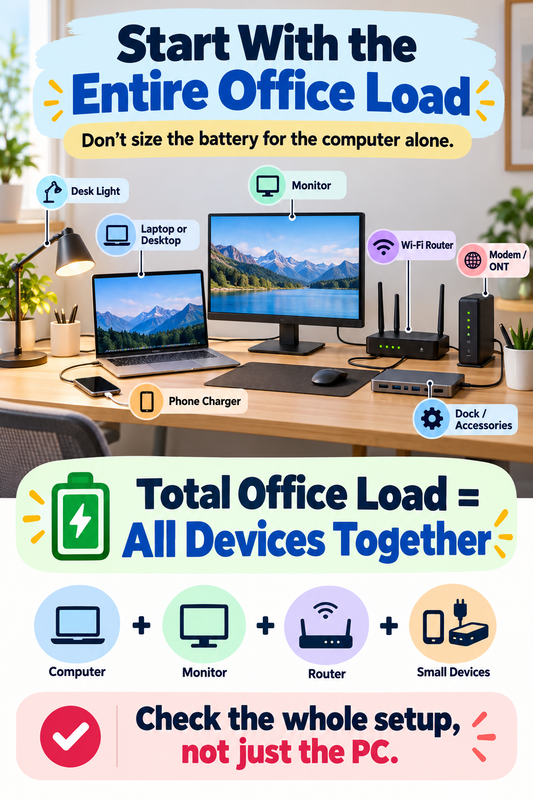
A home office may contain more than one obvious device.
Typical loads can include:
Laptop or desktop computer
External monitor
Wi-Fi router
Modem or optical network terminal
Phone charger
Desk light
Speakers
External drives or docking station
Individually, most of these may consume modest power.
Together, they create the real office load.
This is why sizing only around the computer can underestimate the required battery.
Watts Tell You Power, Not Workday Energy
Suppose a laptop uses an average of:
50 W
If it runs for eight hours:
50 W × 8 h = 400 Wh
That is the energy requirement for the laptop alone.
Now add a monitor using:
30 W × 8 h = 240 Wh
A router and modem might together average:
20 W × 8 h = 160 Wh
Phone charging and a small desk light might add another:
80 Wh
Total:
400 + 240 + 160 + 80 = 880 Wh
So a relatively modest home-office setup can approach:
≈880 Wh for an eight-hour workday
before conversion losses and reserve.
The general relationship between battery energy and runtime is explained here:
https://digitalowl.fika.bar/battery-runtime-formula-01M2JVJ0DBC2706XRP728QTZQ3
A Laptop-Based Office Is Usually the Easier Scenario
Laptop computers are designed around energy efficiency because they already have an internal battery.
That gives a laptop-based office two advantages.
First, average power consumption is often lower than a desktop workstation.
Second, the laptop's internal battery provides some temporary reserve even if external power disappears.
Consider a simple example:
Laptop: 50 W average
Monitor: 30 W
Router + modem: 20 W
Small accessories: 10 W
Combined load:
110 W
For eight hours:
110 W × 8 h = 880 Wh
For four hours:
110 W × 4 h = 440 Wh
The same equipment therefore needs very different storage depending on the required backup duration.
The Monitor Can Be a Significant Part of the Load
The computer gets most of the attention, but an external monitor may account for a meaningful share of office energy use.
Imagine:
Laptop: 45 W
Monitor: 35 W
The monitor adds almost 78% of the laptop's power demand.
Using the laptop screen instead of the external monitor during an outage could reduce the office load substantially.
This highlights an important principle in backup sizing:
load reduction can sometimes be easier than adding more battery capacity.
If the office must operate for a long time, temporarily switching off non-essential screens, speakers or peripherals can noticeably extend runtime.
Desktop Computers Change the Calculation
Desktop systems can create a very different energy budget.
A basic desktop used for office applications might draw relatively modest power, while a high-performance workstation can consume several times more.
Consider a simplified setup:
Desktop PC: 180 W average
Monitor: 35 W
Router + modem: 20 W
Accessories: 15 W
Combined:
250 W
For eight hours:
250 W × 8 h = 2,000 Wh
or:
2 kWh
That is more than twice the energy requirement of the laptop-based example.
A more powerful workstation could push the requirement higher again.
This is why “home office” is not a single battery-sizing category.
The actual computer matters.
Use Real Measurements When Possible
Computer power consumption can vary significantly with workload.
A laptop writing documents may consume far less power than the same laptop compiling code, editing video or charging its internal battery at full speed.
A desktop can move between low idle consumption and much higher loads depending on CPU and GPU activity.
If home-office continuity is important, measuring the full workstation with an energy meter gives a much better estimate.
A useful test is to measure the office during a normal workday and record:
average watts
and ideally:
total Wh consumed over several hours
The Wh figure is particularly useful because it already includes changing device loads over time.
Charging a Laptop Is Different From Running a Charged Laptop
A laptop's power adapter may be rated for:
65 W, 90 W, 100 W or more
but that does not mean the laptop continuously draws the adapter's maximum rating.
The adapter rating represents what it can supply.
Actual power depends on what the laptop is doing and whether its internal battery is charging.
For example, a laptop may consume more power when:
its battery is low
the processor is under heavy load
the screen brightness is high
multiple peripherals are attached
Once the internal battery reaches a high state of charge and the workload drops, consumption may fall.
This is another reason not to size the system directly from charger labels alone.
Battery Capacity Should Include Losses
Suppose your calculated home-office energy requirement is:
900 Wh
A 900 Wh battery does not necessarily deliver exactly 900 Wh to the AC outlets.
The system may lose energy through:
inverter conversion
internal electronics
standby consumption
battery-management overhead
There may also be reserved capacity that prevents complete discharge.
So the practical battery target should be larger than the calculated load requirement.
A simple planning relationship is:
office energy requirement + conversion losses + reserve = target battery capacity
If the office requires approximately 900 Wh for the desired work period, a battery around 1.1–1.3 kWh might represent a more comfortable planning range, depending on system efficiency and the reserve you want.
This is an example, not a universal recommendation.
Four Hours and Eight Hours Are Very Different Scenarios
Backup duration is often the biggest variable.
Take a 120 W office setup.
For two hours:
120 W × 2 h = 240 Wh
For four hours:
120 W × 4 h = 480 Wh
For eight hours:
120 W × 8 h = 960 Wh
For twelve hours:
120 W × 12 h = 1,440 Wh
The hardware has not changed.
Only the required operating time has changed.
This is why battery sizing should always start with a realistic outage or work-duration scenario.
A Practical Light Home-Office Example
Consider:
Laptop: 50 W
One monitor: 30 W
Router + modem: 20 W
Phone + desk light: 10 W
Combined:
110 W
For six hours:
110 × 6 = 660 Wh
Now allow additional capacity for losses and reserve.
A battery around 800 Wh to 1 kWh could be a planning starting point for this limited setup.
Actual results depend on measured device consumption and system efficiency.
A Larger Office Example
Now consider:
Desktop PC: 220 W
Two monitors: 70 W
Router + modem: 20 W
Accessories: 20 W
Combined:
330 W
For eight hours:
330 × 8 = 2,640 Wh
or:
2.64 kWh
After reserve and losses, the storage target can move above 3 kWh.
The difference between this and the laptop example is substantial.
That is why desktop choice, number of displays and workload can matter more than generic “office backup” labels.
Home Office Is Usually Part of a Larger Backup System
In a real outage, the office may not be the only load.
The same battery may also support:
refrigerator
lights
phones
heating controls
other communications equipment
If the office consumes 900 Wh and the rest of the essential household loads require another 2 kWh, the battery should be sized around the combined requirement.
The broader home-backup method is here:
This is especially important when the goal is a whole-house backup system rather than a dedicated office battery.
Reduce the Load Before Increasing the Battery
A useful home-office backup strategy is to identify what can be temporarily removed.
Examples include:
use the laptop's built-in screen instead of an external monitor
turn off a second display
disconnect speakers
avoid charging unnecessary devices
reduce display brightness
pause heavy workloads where practical
The effect can be significant over several hours.
Reducing a continuous load by only:
40 W
for eight hours saves:
40 × 8 = 320 Wh
That can represent a meaningful share of a small backup battery.
A Better Home-Office Sizing Workflow
Use this sequence:
1. List every device that must remain powered.
Do not count only the computer.
2. Measure or estimate average watts.
Use actual measurements where possible.
3. Decide required work duration.
Two hours and eight hours create completely different storage requirements.
4. Calculate Wh.
Average watts × hours = energy requirement
5. Add conversion losses and reserve.
Do not assume nominal battery capacity equals delivered AC energy.
6. Consider load reduction.
Remove non-essential monitors and accessories where possible.
7. Add other household loads if the battery is shared.
The office cannot consume the same stored energy twice.
The Workday Matters More Than the Device Label
The best battery size for a home office depends less on the word “office” and more on the exact equipment and required runtime.
A lightweight laptop setup may need less than 1 kWh for a substantial work period.
A desktop workstation with multiple monitors can require several kilowatt-hours for the same duration.
The right calculation is therefore:
actual office watts × required work hours → Wh
then:
Wh + losses + reserve → battery target
That turns home-office backup from a generic product question into a measurable energy budget — and makes it much easier to choose a realistic battery capacity.
Comments
No comments yet. Be the first to comment!