Battery Backup Sizing Map: Find the Right Guide for Your Scenario
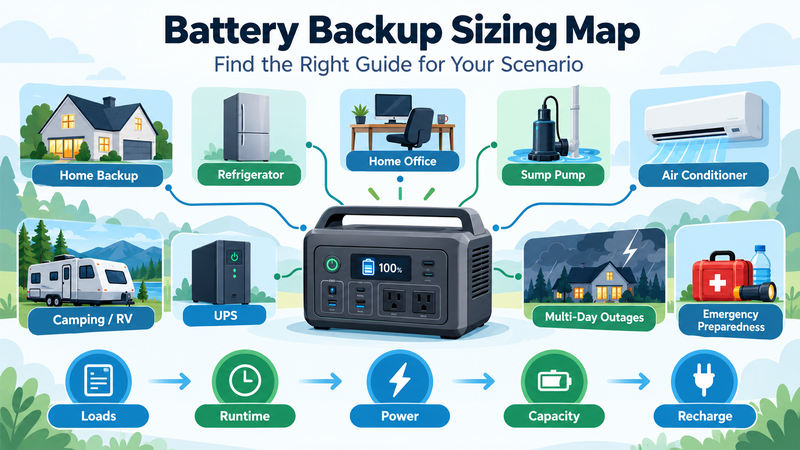
Battery backup sizing becomes confusing when every scenario is treated as the same problem. A refrigerator, home office, air conditioner, RV and multi-day outage all require different assumptions.
The easiest approach is to begin with the load and outage scenario, then move to the appropriate sizing method.
This guide acts as a map across the main battery-backup use cases.
Start With Three Questions
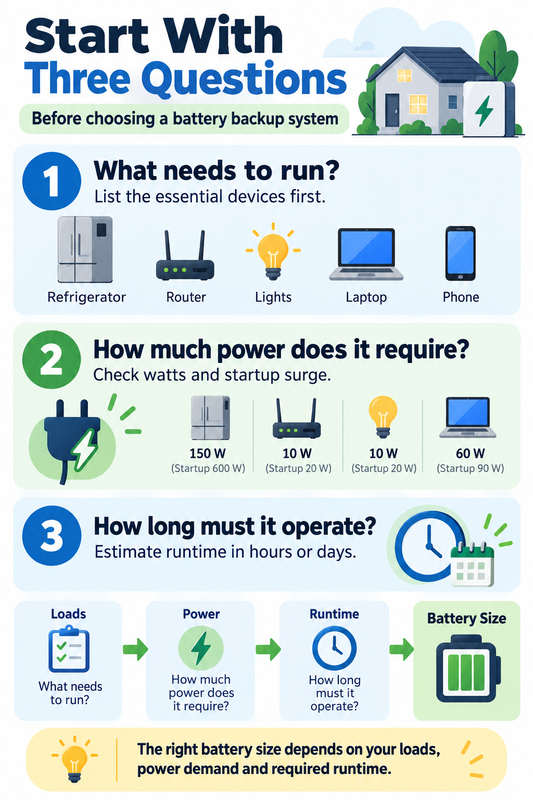
Before choosing a battery, answer:
What needs to run?
How much power does it require?
How long must it operate?
Those three questions determine most of the sizing process.
Capacity answers the energy question. Power answers whether the battery and inverter can operate the load at all.
For the broader battery-capacity framework:
https://medium.com/@volodymyrzh/battery-capacity-explained-mah-wh-amp-hours-decoded-1dc676be5a38
Step 1: Is It One Device or Several?
If you are sizing backup for a single device, start with its power consumption and required runtime.
Basic logic:
Load watts × runtime hours = required load energy in Wh
Then account for:
inverter losses;
usable battery capacity;
reserve margin;
startup surge where relevant.
If several devices must operate together, calculate each load separately and add their energy requirements.
Do not use only total wattage. Two systems with the same peak power can have very different daily energy consumption.
Scenario 1: Portable Power Station
Portable power stations are usually sized around a limited group of loads rather than an entire home.
Common loads include:
phones;
laptops;
lights;
router;
small refrigerator;
small appliances.
Start with the detailed capacity guide:
https://digitalowl.fika.bar/portable-power-station-capacity-explained-01M3WPZ3WWAZBY6JAX7KPFWR96
The key checks are:
stored energy in Wh + inverter output in W + usable capacity
A large Wh rating does not guarantee that a high-power appliance can run.
Scenario 2: Home Backup
Home backup should usually start with a critical-load list rather than total household consumption.
Prioritise:
refrigeration;
communication;
lighting;
internet;
work equipment;
other essential loads.
Detailed guide:
Then decide whether the system is intended for:
several hours;
overnight backup;
one full day;
multiple days.
The longer the autonomy target, the more important recharge strategy becomes.
Scenario 3: Refrigerator Backup
Refrigerators require a different approach because compressors cycle.
Do not simply multiply rated watts by 24 hours.
Use estimated daily energy consumption and also check startup surge.
Detailed guide:
Think in two separate dimensions:
daily Wh determines capacity;
startup watts determine whether the inverter can start the compressor.
Scenario 4: Home Office Backup
A home office usually contains several relatively modest loads:
laptop;
monitors;
router;
external displays;
chargers;
lighting.
Detailed guide:
The main sizing question is often runtime rather than surge.
Calculate the combined working load, multiply it by required working hours and add conversion losses and reserve.
Scenario 5: Sump Pump
A sump pump can have relatively low total energy consumption but demanding startup power.
Detailed guide:
Check:
running watts;
starting watts;
expected duty cycle;
outage duration.
This illustrates why capacity and inverter output cannot be treated as the same specification.
Scenario 6: Air Conditioner
Air conditioners combine high running power with compressor startup requirements.
Detailed guide:
Sizing should consider:
running watts;
startup surge;
operating hours;
compressor cycling;
inverter efficiency;
desired reserve.
Cooling is energy-intensive, so reducing runtime can change required battery capacity dramatically.
Scenario 7: Camping and RV Use
Camping and RV systems usually mix several low- and medium-power loads:
refrigerator;
lighting;
phones;
laptops;
pumps;
fans;
small appliances.
Detailed guide:
https://digitalowl.fika.bar/battery-capacity-for-camping-and-rv-use-01M43JPJ6BP6G3J4ZG3CS34RFH
The most useful approach is a daily Wh budget.
Solar charging can reduce required stored capacity, but expected solar production should not be treated as guaranteed energy.
Scenario 8: UPS Backup
UPS sizing is often about maintaining continuity for a short period rather than providing large amounts of energy.
Detailed guide:
https://digitalowl.fika.bar/ups-runtime-and-battery-capacity-01M43KS0FNPWTY5YQQMRKSKERT
Important factors include:
load watts;
battery Wh;
conversion losses;
standby consumption;
desired runtime.
A UPS designed for a few minutes of graceful shutdown is a different system from one intended to power equipment for several hours.
Scenario 9: Multi-Day Outages
Long outages change the calculation.
Instead of focusing only on battery capacity, think in terms of:
daily energy consumption × number of days − realistic recharge
Detailed guide:
https://digitalowl.fika.bar/battery-capacity-for-multi-day-outages-01M43RTN3WEAM6XD3ZRQSFW7F2
Multi-day planning should consider:
daily critical-load energy;
solar or generator recharge;
reserve margin;
expandable capacity;
reduced-consumption operating modes.
This is also where renewable-energy storage sizing becomes especially relevant:
Scenario 10: Emergency Preparedness
Emergency preparedness is less about maintaining normal lifestyle and more about preserving essential functions.
Detailed guide:
https://digitalowl.fika.bar/battery-capacity-for-emergency-preparedness-01M45XD0SJ1SBJGP9QMVHZYBK6
Separate loads into:
critical;
useful;
optional.
Communication, refrigeration and essential lighting normally belong near the top of the list. High-power convenience loads should usually be evaluated separately.
The Decision Map
Use this simplified path:
One device?
→ calculate its watts, runtime and surge.
Several devices?
→ build a combined Wh budget.
Motor or compressor?
→ check startup power.
One-day outage?
→ size for daily energy plus reserve.
Multi-day outage?
→ include daily recharge and autonomy.
Solar available?
→ subtract realistic replenishment, not theoretical maximum production.
Emergency use?
→ remove optional loads before increasing battery size.
Capacity and Power Must Both Pass
Every backup system needs two separate checks.
Capacity Check
Can the battery store enough energy?
Measured mainly in:
Wh;
kWh.
Power Check
Can the battery and inverter supply the required load?
Measured mainly in:
continuous watts;
surge watts.
A 2kWh battery may contain enough energy for a device but still fail if its inverter cannot supply the startup power.
The reverse is also possible: a powerful inverter may run the appliance but empty a small battery very quickly.
Include Losses and Usable Capacity
Theoretical battery capacity is not the same as energy delivered to the load.
Real systems lose energy through:
inverter conversion;
DC conversion;
wiring;
standby consumption;
battery-management overhead.
Usable capacity may also be lower than the rated figure.
A simple planning model is:
Required battery capacity = Load energy ÷ system efficiency ÷ usable fraction
Then add a reserve appropriate to the application.
Recharge Can Change the Answer
Two identical homes may need very different battery capacities if one can recharge daily and the other cannot.
Possible recharge sources include:
grid recovery;
solar;
generator;
alternator or vehicle charging.
This is why battery sizing should be treated as a system problem rather than a single product-specification problem.
The Bottom Line
There is no single correct battery size for “backup power”.
The right capacity depends on the scenario.
Use this sequence:
Identify the loads.
Calculate daily or required Wh.
Check continuous and startup power.
Define the required autonomy.
Account for losses and usable capacity.
Add reserve.
Include realistic recharge.
Choose the detailed sizing guide that matches the use case.
The best battery backup system is not necessarily the largest one. It is the system sized around the loads, runtime and recharge conditions that actually matter.
Comments
No comments yet. Be the first to comment!