UPS Runtime and Battery Capacity
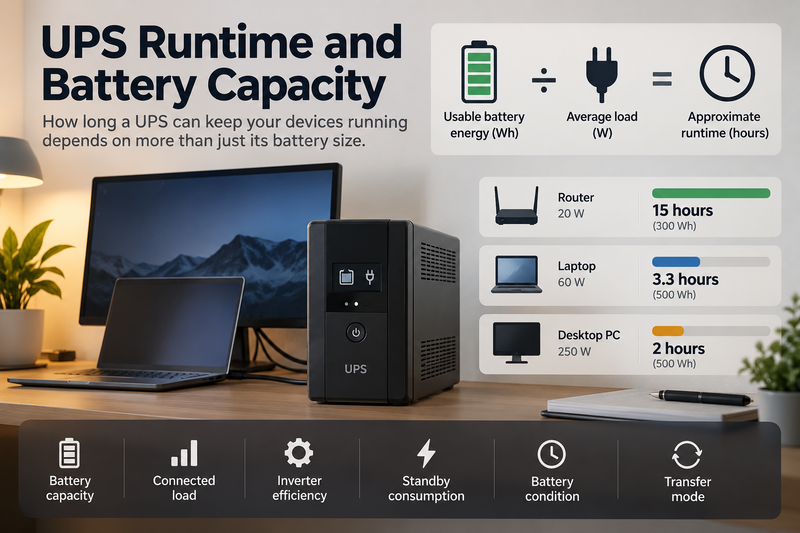
A UPS is designed to keep equipment running when grid power disappears, but its advertised battery size alone does not tell you how long connected devices will stay online. Runtime depends on battery capacity, connected load, inverter efficiency, standby consumption, battery condition and the way the UPS operates during an outage.
A practical starting point is:
usable battery energy ÷ average load = approximate runtime
For the broader battery-capacity framework:
https://medium.com/@volodymyrzh/battery-capacity-explained-mah-wh-amp-hours-decoded-1dc676be5a38
Battery Capacity and UPS Runtime Are Different Specifications
Battery capacity describes how much energy the UPS can store. Runtime describes how long that stored energy can support a particular load.
The same UPS might run a router for several hours but a desktop computer for only a fraction of that time.
Suppose a UPS can deliver approximately:
500 Wh of usable energy
With a 50 W load:
500 Wh ÷ 50 W = 10 hours
With a 250 W load:
500 Wh ÷ 250 W = 2 hours
With a 500 W load:
500 Wh ÷ 500 W = 1 hour
These are simplified theoretical results. Real runtime is usually lower because of system losses and operating overhead.
More on the basic runtime calculation:
https://digitalowl.fika.bar/battery-runtime-formula-01M2JVJ0DBC2706XRP728QTZQ3
Start With the Load, Not the UPS Rating
To estimate runtime, first calculate the power demand of the equipment you actually want to keep running.
A home-office UPS might support:
Router: 15 W
Laptop: 60 W
Monitor: 30 W
Network storage: 25 W
Total:
130 W
If the UPS can provide approximately 500 Wh of usable energy:
500 Wh ÷ 130 W ≈ 3.85 hours
If the complete system effectively delivers 85% of stored energy:
500 Wh × 0.85 = 425 Wh
Then:
425 Wh ÷ 130 W ≈ 3.27 hours
That is a more realistic estimate.
Small Loads Can Produce Long Runtime
Low-power networking equipment can behave very differently from a desktop computer.
Suppose:
Router = 12 W
Modem or optical terminal = 8 W
Combined load:
20 W
A UPS with 300 Wh of usable energy could theoretically provide:
300 Wh ÷ 20 W = 15 hours
Actual runtime will be lower after accounting for internal consumption and conversion losses, but it can still be much longer than with a PC.
Large Loads Drain a UPS Quickly
Now consider a workstation drawing:
350 W
With the same 300 Wh usable battery:
300 Wh ÷ 350 W ≈ 0.86 hours
That is about 51 minutes before losses.
Add another monitor or higher CPU/GPU load and runtime falls further. UPS capacity therefore needs to match both the power level and the required continuity period.
UPS Power Rating Is Not Battery Capacity
A UPS may advertise its output in:
W
or:
VA
These values describe how much load the unit can support at one time. They do not directly tell you how much energy is stored.
Battery energy is measured in:
Wh
or can be estimated from battery voltage and amp-hours.
A UPS capable of supplying 1,000 W does not necessarily contain 1,000 Wh of usable battery energy. It might support a 1,000 W load electrically but only for a short period.
So there are always two separate questions:
Can the UPS support the load power?
Can its battery support that load for long enough?
Transfer Mode Is Part of What Makes a UPS Different
A UPS is not simply a battery with AC outlets. Its main purpose is continuity.
Under normal conditions, grid power may supply the connected devices while the UPS keeps its battery ready. When grid power fails, the system switches to battery operation.
Common high-level categories include:
standby/offline UPS
line-interactive UPS
online/double-conversion UPS
The electrical architecture differs, but for battery sizing the important point is that the UPS is designed around automatic continuity rather than ordinary portable power use.
A Portable Power Station Is Not Automatically a UPS
Portable power stations can also power computers, routers and other electronics. Some support pass-through operation, meaning they can receive charging power while simultaneously supplying loads.
More on pass-through charging:
https://digitalowl.fika.bar/what-is-pass-through-charging-01M3PM70SHY2CKT6F32ZCJF03P
However, pass-through charging alone does not automatically make a portable power station equivalent to a dedicated UPS.
Important differences can include:
transfer time
automatic switchover behaviour
AC output during grid failure
continuous operating design
battery management behaviour
manufacturer recommendations for permanent connected use
For equipment that cannot tolerate interruption, these characteristics matter in addition to battery capacity.
Standby Consumption Reduces Runtime
A UPS consumes some energy itself.
Its electronics, inverter, monitoring system, display, cooling fan or communication hardware may all require power.
Imagine:
Connected equipment = 20 W
UPS internal consumption = 10 W
Total effective battery load:
30 W
With 300 Wh usable capacity:
300 Wh ÷ 30 W = 10 hours
Without accounting for the UPS itself:
300 Wh ÷ 20 W = 15 hours
That is a major difference. Internal overhead becomes especially important with small loads.
Inverter Efficiency Also Matters
Most UPS batteries store DC energy while many connected devices receive AC power.
The path is roughly:
battery → inverter → AC load
Conversion is not perfectly efficient.
If a device needs 400 Wh of AC energy during an outage, the battery may need to provide more than 400 Wh.
Example:
600 Wh nominal usable battery energy
Assume:
85% effective delivery
Then:
600 × 0.85 = 510 Wh
With a 100 W average load:
510 Wh ÷ 100 W = 5.1 hours
This is more realistic than dividing the full nominal capacity by the load.
Battery Age Can Change the Result
UPS runtime is also affected by battery condition.
A new battery may provide close to its expected usable capacity, while an older battery may provide noticeably less.
A UPS that once supported equipment for 60 minutes might later provide only 40 or 45 minutes even if the load has not changed.
For critical equipment, runtime should therefore be tested periodically rather than assumed from the original specification forever.
Example: Router and Network Backup
Suppose:
Router: 15 W
Modem/ONT: 10 W
Switch: 15 W
Total:
40 W
UPS usable energy after losses:
320 Wh
Estimated runtime:
320 Wh ÷ 40 W = 8 hours
If the UPS itself consumes another 8 W:
Total effective load = 48 W
Then:
320 Wh ÷ 48 W ≈ 6.7 hours
The internal overhead reduces runtime by more than an hour.
Example: Home Office UPS
Suppose:
Desktop PC: 180 W
Monitor: 35 W
Router: 15 W
Total:
230 W
If the UPS delivers approximately:
600 Wh usable energy
then:
600 Wh ÷ 230 W ≈ 2.6 hours
If effective energy after losses is closer to:
510 Wh
runtime becomes:
510 Wh ÷ 230 W ≈ 2.2 hours
If the desktop load rises under heavy processing, runtime becomes shorter again.
Short Runtime and Long Runtime Require Different Thinking
Many UPS systems are designed primarily to:
ride through a short outage
save work
shut equipment down safely
or:
keep networking equipment online until power returns
That is different from designing a battery system for eight, twelve or twenty-four hours of backup.
If the required continuity period becomes very long, a larger battery system or portable power station may become more practical than a traditional small UPS.
A Practical UPS Runtime Workflow
1. List the equipment connected to the UPS. Include every device that must remain powered.
2. Estimate or measure average watts. Actual load is more useful than simply adding maximum nameplate ratings.
3. Find the usable battery energy. Do not confuse W or VA with Wh.
4. Account for conversion losses. Delivered battery energy will usually be lower than nominal capacity.
5. Include UPS standby consumption. This is particularly important with small loads.
6. Calculate runtime.
Usable Wh ÷ total effective W = approximate hours
7. Add reserve. Do not design critical continuity around reaching exactly zero battery.
8. Check transfer behaviour separately. Battery size does not tell you whether connected equipment will tolerate the switchover.
UPS Runtime Is a System Calculation
The most useful UPS question is not:
“How big is the battery?”
It is:
“How long can this UPS support this particular load?”
That requires combining stored energy with connected power demand, inverter losses, internal consumption and battery condition.
A UPS should also be distinguished from a conventional portable power station. Both can store energy and power electronics, but a UPS is primarily designed around automatic continuity and transfer behaviour.
Start with the load, calculate usable Wh, account for system overhead, and then estimate runtime. That produces a much more useful answer than choosing a UPS from its headline W or VA rating alone.
Comments
No comments yet. Be the first to comment!