Why WooCommerce Stores Need More Than Basic Hosting
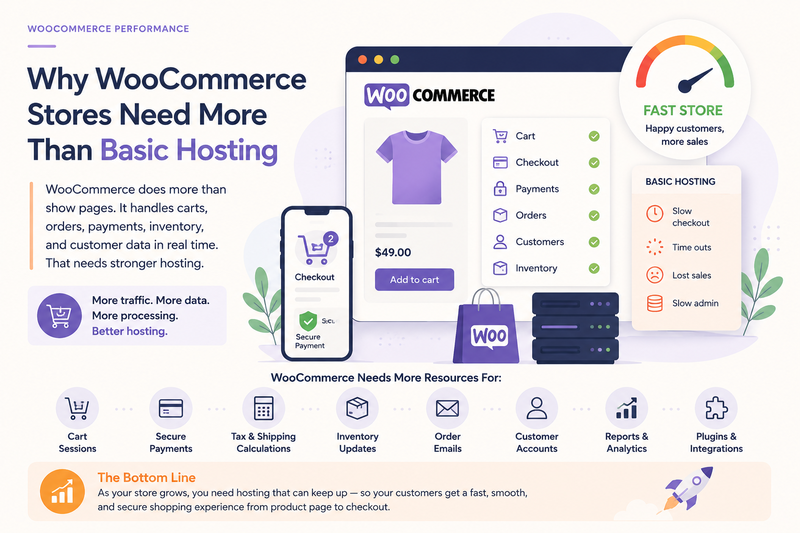
A WooCommerce store is not just a normal website with a shopping cart added on top.
It may look like a regular WordPress site from the outside. There are pages, product descriptions, images, menus, blog posts, and forms. But behind the scenes, WooCommerce adds a much heavier layer of dynamic work.
A simple website can often serve mostly static pages. A store needs to manage products, carts, customers, orders, payments, shipping, taxes, coupons, stock, emails, and checkout actions. That means the hosting environment has to support more than page display. It has to support business activity.
This is why basic hosting can become a problem for growing WooCommerce stores.
WooCommerce has more moving parts
A normal content website usually has a simpler job. It needs to show pages, posts, images, and maybe a contact form. Good caching can help a lot because many visitors may see the same version of the same page.
WooCommerce is different because many parts of the store depend on live information.
A store may need to handle:
product variations;
cart sessions;
customer accounts;
checkout steps;
payment gateways;
tax calculations;
shipping rules;
coupons and discounts;
order creation;
inventory updates;
confirmation emails.
Each of these parts can add server work. Some tasks need database queries. Some need plugin logic. Some need external services. Some cannot be fully cached because the information changes for each customer.
That is why a WooCommerce store can feel fine when it is small, then become slower as traffic, products, plugins, and orders increase.
Basic hosting may work at the beginning
Basic hosting is not always wrong.
A new store with a small catalog, low traffic, few plugins, and simple products may run acceptably on a basic setup. At that stage, the store may not have many orders, many cart sessions, or many customers using the site at the same time.
The problem appears when the store grows but the hosting plan stays the same.
At first, the signs may look small. Product pages load a little slower. The cart updates with delay. Checkout feels less smooth. The admin area takes longer to open orders or save product changes. During busy periods, the store feels less stable than usual.
These are not always design problems. Sometimes they show that the store is asking more from the server than basic hosting can comfortably provide.
Checkout needs stable resources
Checkout is one of the most important reasons WooCommerce stores need stronger hosting.
A checkout page is not just another page. It often needs to process cart data, customer details, shipping options, payment methods, coupon checks, order totals, fraud checks, and confirmation steps. If the server responds slowly during checkout, the customer may hesitate exactly when they are ready to buy.
That hesitation can hurt sales.
A slow checkout may make customers wonder whether the payment button worked, whether the order is safe, or whether they should leave and try later. The issue may be technical, but the customer experiences it as uncertainty.
A previous Fika article explains why checkout speed becomes so important near the final step of the buying journey:
For WooCommerce, checkout performance depends on both optimization and hosting capacity. A clean checkout design helps, but the server still needs enough room to process dynamic work smoothly.
Store admin also becomes heavier
WooCommerce does not only affect customers. It also affects the people managing the store.
The WordPress admin area becomes more demanding when WooCommerce is active. Store owners may need to load orders, update products, manage inventory, check reports, process refunds, adjust coupons, review customer data, and monitor payment statuses.
That work is database-heavy. If hosting resources are limited, the admin area can become slow even when the public site looks acceptable.
Common backend symptoms include:
orders take too long to open;
product lists load slowly;
saving product changes feels delayed;
reports or analytics freeze;
coupon settings respond slowly;
inventory updates take too long;
admin screens feel worse during traffic spikes.
This matters because a store is not only judged by the customer-facing pages. It also has to be manageable for the business. If the backend becomes slow, daily operations become harder.
More products and plugins add pressure
WooCommerce stores often become heavier over time.
A store may start with a small product catalog and a few basic settings. Later, the owner adds product variations, reviews, filters, upsells, cross-sells, abandoned cart tools, analytics, email automation, security tools, payment options, shipping integrations, and tracking scripts.
Each addition may be useful. Together, they create more work.
The store may need to process more database queries, load more plugin rules, calculate more conditions, and handle more customer actions. If the hosting environment has limited CPU, memory, database performance, or PHP workers, these additions can make the store feel unstable.
This does not mean every store needs the most expensive hosting. It means WooCommerce needs hosting that matches the workload.
Better hosting supports store growth
A stronger hosting setup does not fix every WooCommerce problem by itself. A badly built store can waste resources on any server. Large images, too many plugins, poor theme choices, weak caching, and messy database habits still need attention.
But once the store is reasonably optimized, hosting becomes a larger part of the performance question.
For a broader guide on choosing a hosting setup for WooCommerce speed and sales, this article explains the main factors in more detail:
The main point is simple: WooCommerce stores need more than basic hosting because they do more than display pages.
They process carts. They handle checkout. They manage orders. They support customer actions. They run business workflows. As the store grows, hosting needs to support all of that work without making the buying experience feel slow or uncertain.
Comments
No comments yet. Be the first to comment!