Why Checkout Speed Matters More Than Store Owners Think
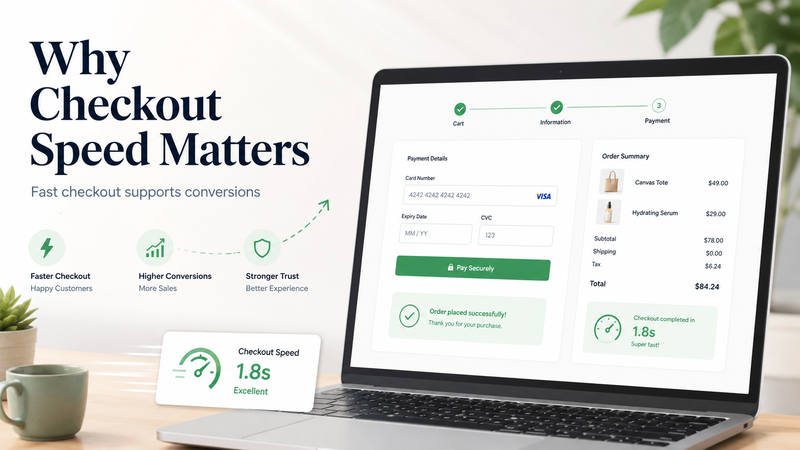
Checkout speed is not just a technical detail. It is one of the moments where website performance becomes directly connected to revenue.
A visitor can browse slowly and still stay interested. They can read a product page, compare options, check reviews, and think about the purchase. But checkout is different. At checkout, the visitor has already moved from interest to action. They are no longer only looking. They are trying to complete something.
That is why a slow checkout can feel more serious than a slow article page or a slow homepage. It does not only interrupt browsing. It interrupts commitment.
Checkout is a fragile moment
Checkout is where trust, attention, and patience meet.
A customer may already have some small doubts before buying. They may be thinking about price, shipping, delivery time, payment security, return policy, or whether they really need the product. A smooth checkout helps them continue. A slow checkout gives those doubts more time to grow.
This is why checkout speed matters more than many store owners expect. The customer is close to finishing the order, but they are also very sensitive to friction. If the page freezes, the payment step loads slowly, or the order confirmation takes too long, the experience can start to feel unsafe.
Slow checkout can create questions in the customer’s mind:
Did the payment button work?
Is the order being processed?
Is the store reliable?
Will I be charged twice?
Should I leave and try later?
Is this site secure enough?
These questions are dangerous because they appear at the worst possible time. The customer is not evaluating a blog post anymore. They are deciding whether to complete a transaction.
Speed affects confidence
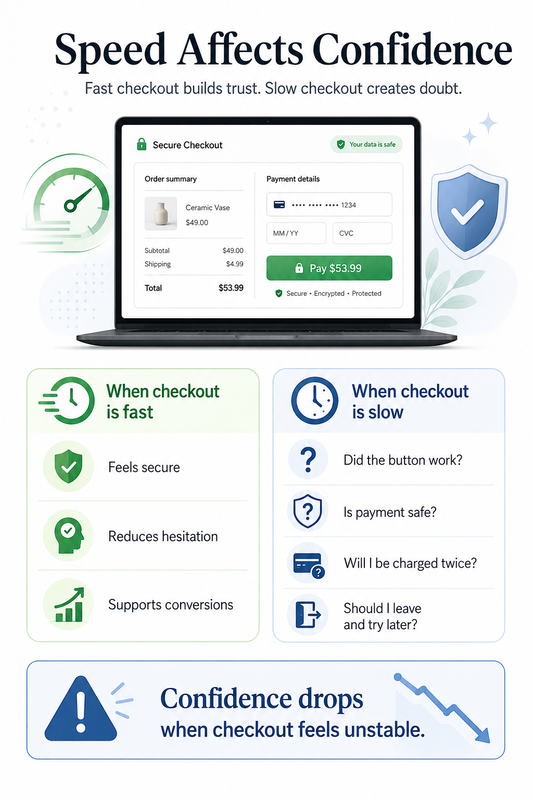
A fast checkout does not guarantee a sale by itself. The product still needs to make sense. The price still needs to feel fair. The shipping information still needs to be clear. The store still needs to look trustworthy.
But speed helps protect the customer’s confidence.
When checkout moves smoothly, the customer does not need to think about the website. They can focus on finishing the order. When checkout feels slow or unstable, the website itself becomes the problem.
This is similar to what happens with other conversion points. Contact forms, landing pages, quote requests, booking forms, and checkout pages all need to feel responsive because they sit close to action. In this previous Fika article, the same idea is explained through contact forms and lead generation:
https://digitalowl.fika.bar/why-contact-forms-need-to-feel-fast-01KS21B77XC10P9X265AGGBH6S
Checkout is the ecommerce version of that problem. If the action feels delayed, the visitor may hesitate. If the delay happens near payment, the hesitation can become stronger.
Checkout is harder than a normal page
A store homepage can often be cached. A blog post can often be served as a prepared version. Even many category pages can be optimized so they load with less repeated work.
Checkout is not that simple.
A checkout page often needs live data. It may need to check the cart, calculate shipping, validate coupons, apply taxes, load payment options, confirm product availability, process customer details, and create the order. It may also connect with payment gateways, fraud tools, email systems, analytics scripts, and shipping integrations.
That means checkout can depend on many moving parts:
cart data;
customer information;
coupon checks;
tax calculations;
shipping rules;
payment gateways;
fraud or security checks;
order creation;
confirmation emails;
third-party scripts.
Each part may be useful. Together, they create pressure. If hosting resources are limited, the checkout process can become one of the first places where the problem becomes visible.
Cached speed can hide checkout problems
A store can look faster than it really is.
The homepage may open quickly. Product pages may feel acceptable. A speed test may not look terrible. But if those pages are cached, they may not show how the site behaves when it needs to process a real order.
Checkout reveals a different kind of performance. It tests how well the website handles dynamic work. It shows whether the server, database, plugins, payment integrations, and ecommerce logic can respond smoothly when the customer is ready to buy.
This is why store owners should not judge performance only by the first page a visitor sees. A fast first impression helps, but the sale still depends on what happens later.
Important checkout warning signs include:
the checkout page loads slowly;
payment options appear with delay;
coupon validation feels slow;
shipping rates take too long to update;
the order button feels unresponsive;
confirmation takes too long after payment;
checkout becomes worse during traffic spikes.
These are not only UX problems. They can become sales problems.
Better checkout speed supports conversions
Checkout speed is part of conversion performance because it protects momentum.
A customer who reaches checkout has already given the store a chance. They have spent attention, compared options, and decided to move forward. The store should make that next step feel easy, stable, and safe.
This does not mean every store needs an expensive hosting setup from day one. A small store with light traffic may not need much. But as products, plugins, visitors, orders, tracking tools, and integrations grow, checkout can become heavier. At that point, performance depends on more than design.
For a broader look at how speed affects trust, leads, checkout behavior, and sales, this guide explains the conversion side in more detail:
https://medium.com/@wwwebadvisor/how-website-speed-affects-conversions-489751a34a01
The main point is simple: checkout speed matters because checkout is where hesitation becomes expensive.
A slow page may lose attention. A slow checkout may lose a customer who was already ready to buy.
Comments
No comments yet. Be the first to comment!