Why WooCommerce Checkout Is Harder to Optimize
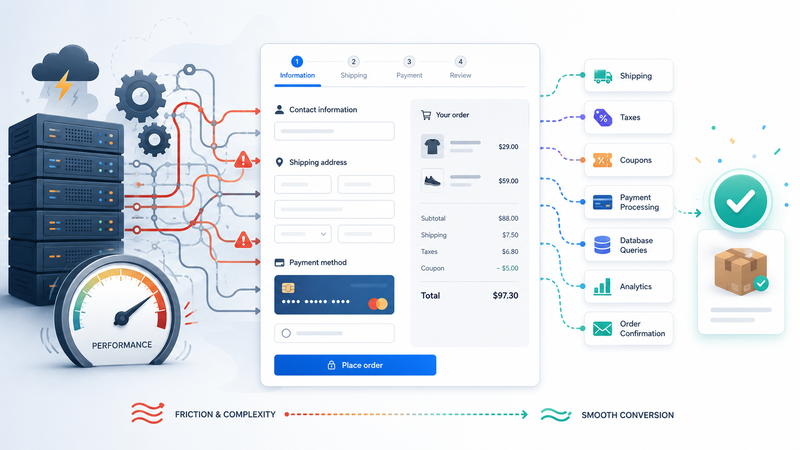
WooCommerce checkout is not a normal website page.
A homepage can often be cached. A blog post can often be served quickly with fewer dynamic changes. A simple landing page can usually be optimized by reducing scripts, compressing images, improving layout, and removing unnecessary elements. Checkout is different because it has to process real customer data in real time.
That is why WooCommerce checkout can become one of the first places where weak hosting becomes visible. The store may look fine on product pages. The homepage may feel acceptable. Even the cart may work well enough during normal traffic. But checkout has more moving parts, and every extra delay can affect whether a customer completes the order.
Checkout has to do many jobs at once
A checkout page is not just showing content to a visitor.
It often has to check the cart, customer details, shipping methods, taxes, coupons, payment options, product availability, user sessions, and order rules. It may also connect with external services such as payment gateways, fraud checks, address validation tools, email systems, analytics scripts, and CRM integrations.
That means the page is doing more than loading a design. It is asking the server to calculate, validate, update, and communicate with other systems. Each of those tasks may be small on its own, but together they create pressure.
WooCommerce checkout may need to handle:
customer session data;
cart and product information;
shipping and tax calculations;
coupon validation;
payment gateway communication;
order creation;
stock updates;
confirmation emails;
tracking and analytics events.
This is why checkout performance is more fragile than a normal static page. A cached page can hide many hosting limits. Checkout usually cannot hide them as easily.
Optimization helps, but it has limits
Store owners often try to fix checkout speed by installing performance plugins, reducing images, removing unnecessary scripts, or cleaning up the site. These steps can help. They should usually be done before blaming hosting.
But checkout still needs enough server resources to process dynamic work.
If the hosting environment is weak, overcrowded, or limited, optimization may only reduce part of the problem. The checkout page may still feel slow when several customers are active at once. It may still hesitate during promotions. It may still become unstable when plugins, payment gateways, and database queries all need attention at the same time.
This is where WooCommerce performance becomes different from general website speed. You are not only trying to make a page appear faster. You are trying to make a business transaction feel smooth, safe, and reliable.
The previous Fika article explained why WooCommerce stores often need more than basic hosting:
Checkout is one of the clearest examples of that idea. It is the point where hosting quality, store complexity, and customer trust meet.
Slow checkout can hurt buyer confidence
A slow checkout is not only a technical issue.
When a customer is ready to pay, hesitation becomes expensive. If the page loads slowly, if shipping options take too long to appear, if the payment step feels delayed, or if the order button does not respond quickly, the customer may start doubting the store.
They may wonder whether the payment is safe. They may refresh the page. They may leave and decide to buy later. Some may abandon the order completely, even if they liked the product.
This is why checkout speed matters more than a simple speed score. The customer is already close to conversion. The store has already done the hard work of attracting attention, presenting the product, and getting the customer to the final step. A weak checkout experience can waste all of that effort.
Hosting becomes more important as the store grows
A small WooCommerce store may not feel checkout pressure at first.
There may be only a few products, few visitors, simple shipping rules, and occasional orders. Under those conditions, basic hosting may appear good enough. The problem usually appears when the store grows.
Growth adds more products, more images, more variations, more plugins, more customers, more tracking tools, and more background tasks. Promotions can create sudden traffic spikes. SEO can bring more visitors to product pages. Email campaigns can send buyers to the store at the same time. All of this creates more work for the server.
At some point, the question is no longer only “Is the checkout page optimized?”
The better question is: “Can the hosting environment support checkout under real buying conditions?”
A detailed guide to choosing the right hosting setup for WooCommerce speed and sales is here:
Checkout needs stability, not just speed
A fast checkout is good. A stable checkout is even more important.
Customers need the process to feel predictable. The cart should update correctly. Shipping options should appear without confusion. Payment should load smoothly. The confirmation page should work. The order should be created properly. The store owner should not have to worry that traffic spikes will make the most important page unreliable.
This is why checkout optimization should be viewed as a system, not a single plugin setting.
The site structure matters. The theme matters. Plugins matter. Scripts matter. Payment gateways matter. Database health matters. Hosting matters too, especially when checkout has to process real-time actions instead of serving a cached page.
Better hosting will not fix every WooCommerce problem. A badly built store can still be slow on a stronger server. But if the store is already reasonably optimized and checkout still struggles under normal growth, the hosting layer may be part of the bottleneck.
For WooCommerce, checkout is where performance becomes revenue.
It is not just another page. It is the point where speed, trust, infrastructure, and sales meet.
Comments
No comments yet. Be the first to comment!