Why Remote Workers Need a Backup Power Plan
Remote work feels flexible until one basic thing disappears: electricity.
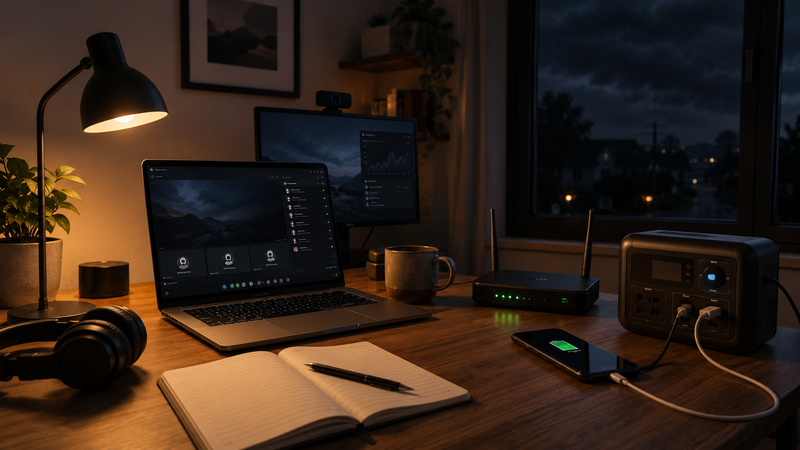
A laptop, phone, router, second monitor, desk lamp, microphone, camera, and charging cable may look like a simple home office setup. But most of that setup depends on stable power. When the lights go out, remote work can stop much faster than people expect.
For freelancers, students, creators, online business owners, and remote employees, this is not only an inconvenience. A short outage can interrupt a client meeting, delay a file upload, break a live class, stop an exam, cancel a sales call, or make a deadline harder to meet. That is why a backup power plan is becoming part of a serious remote work setup.
Power Outages Do Not Have to Be Long to Cause Problems
Many people imagine blackouts as dramatic, all-day events. But remote work can be affected by much shorter interruptions. Even a 30-minute outage can be enough to cause real problems if it happens at the wrong time.
The issue is timing. A short outage during a quiet evening may not matter much. The same outage during a video call, presentation, client deadline, livestream, or online test can feel much more serious.
A remote worker may lose:
internet connection;
laptop charging;
phone charging;
access to cloud files;
video call stability;
lighting for calls or recordings;
the ability to upload or submit work on time.
This is why remote workers should not think only in terms of “major emergencies.” The more practical question is simple: can your work continue for one or two hours if the power suddenly goes out?
The Router Is Often the Weakest Link
Many remote workers focus on the laptop first. That makes sense, because the laptop is the main work device. But in many home offices, the Wi-Fi router is actually the first thing that kills productivity during a power outage.
A laptop may still have a battery. A phone may still have some charge. But if the router loses power, online work stops immediately unless mobile data is strong enough to replace it.
This matters for:
Zoom, Google Meet, or Teams calls;
cloud documents;
online dashboards;
client portals;
learning platforms;
file transfers;
website work;
publishing tools;
email and messaging.
A backup power plan should therefore include the router, not just the laptop. In many cases, keeping the router alive is the difference between staying productive and disappearing from an important call.
For many remote workers, this is one reason portable power stations are no longer just camping gear. They can become a practical home office backup tool for keeping a laptop, router, phone, and small light running during an outage.
A useful visual explanation of this trend is the video “Why Everyone Is Buying Portable Power Stations”:
A Backup Power Plan Does Not Mean Powering the Whole Home
One mistake is thinking backup power has to mean running everything. For most remote workers, the goal is much smaller. You do not need to keep the entire house operating. You need to protect the work-critical devices.
A basic remote work backup setup may only need to support:
one laptop;
one Wi-Fi router;
one phone;
one desk lamp;
one monitor, if needed;
one small microphone or camera setup.
That is a much more realistic target. It reduces the size, cost, and complexity of the backup plan.
Instead of asking, “How do I power my whole home?” a remote worker should ask, “What do I need to stay online and finish essential work for the next few hours?”
That question usually leads to a clearer plan.
Freelancers Have Even More Reason to Prepare
For freelancers and solo professionals, a power outage can directly affect income. There may be no IT department, office backup system, or manager who can easily rearrange the day. If a client expects delivery and the freelancer disappears without warning, the relationship can suffer.
This does not mean every outage becomes a disaster. But repeated disruptions can create a pattern. Missed calls, late files, and poor communication can make a freelancer seem unreliable, even when the cause is outside their control.
A backup power plan helps protect the basics:
client communication;
deadline delivery;
scheduled calls;
payment-related work;
project uploads;
access to files and tools;
professional reputation.
For freelancers, the value of backup power is not only technical. It is also about trust.
Students and Online Learners Need Stability Too
Remote work is not limited to paid jobs. Students also depend on stable power for online classes, assignments, research, exams, and group projects.
A sudden outage can interrupt a lecture, disconnect a student from a test, or prevent an assignment from being submitted on time. In some cases, the student may be able to explain the situation later. In other cases, the lost time still creates stress and extra work.
A simple backup setup can help students keep access to:
online classes;
learning platforms;
cloud documents;
email;
research tabs;
video calls;
phone communication.
The goal is not to create a perfect emergency system. The goal is to avoid losing the most important work at the worst possible moment.
Content Creators Need Backup Power for More Than Convenience
Creators often use more than a laptop. A basic content setup may include lights, cameras, microphones, hard drives, routers, monitors, tablets, and charging devices. A sudden outage can interrupt recording, editing, uploading, livestreaming, or publishing.
This is especially important for creators who work around schedules. A video upload, podcast recording, live session, or sponsored deadline may be time-sensitive.
A backup power plan can help creators protect:
recording sessions;
livestreams;
file transfers;
camera batteries;
editing work;
internet connection;
lighting for video calls or shoots.
For creators, power stability can become part of production quality. The audience may never see the backup system, but they benefit from the consistency it creates.
What a Practical Backup Power Plan Should Include
A remote work backup plan does not need to be complicated. It should be built around the devices that matter most and the amount of time they need to run.
A simple plan can include:
a fully charged laptop before important work sessions;
a charged phone with mobile data available;
a power bank for small devices;
a portable power station for the router and laptop;
a small LED desk lamp;
saved offline copies of important files;
a backup internet option, such as mobile hotspot;
a clear list of what gets plugged in first.
The list matters because outages create stress. When the power goes out, it is easier to follow a simple plan than to decide everything in the moment.
What to Power First
During an outage, priority matters. Plugging in everything at once can waste backup capacity. The smarter approach is to power only what supports communication and essential work.
A good order is:
Wi-Fi router or modem, if the internet line still works.
Laptop, especially if the battery is low.
Phone, because it is the backup communication tool.
Small light, if the room is too dark to work.
Monitor or accessories only if they are truly needed.
This keeps the setup focused. The goal is not comfort first. The goal is continuity first.
How Much Backup Time Is Enough?
The right amount of backup time depends on the type of work. Some people only need enough power to finish a call and save files. Others need several hours of online access.
A useful starting target is two to four hours of backup for essential devices. That can be enough to handle many short outages, finish urgent tasks, or move to another location if needed.
Remote workers should think about their real schedule. Someone who works mostly with documents may need less power than someone who edits video or runs livestreams. A person who depends heavily on online meetings may prioritize router backup more than extra monitor power.
The best plan is not the biggest plan. It is the plan that matches the real risk.
Backup Power Also Reduces Stress
Power outages create practical problems, but they also create mental pressure. When the electricity goes out, people quickly start checking battery percentages, messages, deadlines, and internet status.
A backup power plan gives a sense of control. Instead of reacting in panic, the remote worker already knows what to do. The router gets plugged in. The laptop stays charged. The phone remains available. The most important work continues.
That calm response can be just as valuable as the power itself.
Final Thoughts
Remote work depends on more than discipline, software, and a good laptop. It also depends on a stable environment. Electricity and internet are part of that environment.
A backup power plan does not have to be expensive or complicated. It only has to protect the essential devices that keep work moving. For many people, that means a laptop, router, phone, and small light.
Short outages are easy to ignore until they happen during something important. A good backup setup turns that moment from a crisis into a manageable interruption.
For remote workers, backup power is no longer just emergency gear. It is part of staying reliable, connected, and ready.
Comments
No comments yet. Be the first to comment!