What to Power First During a 72-Hour Blackout
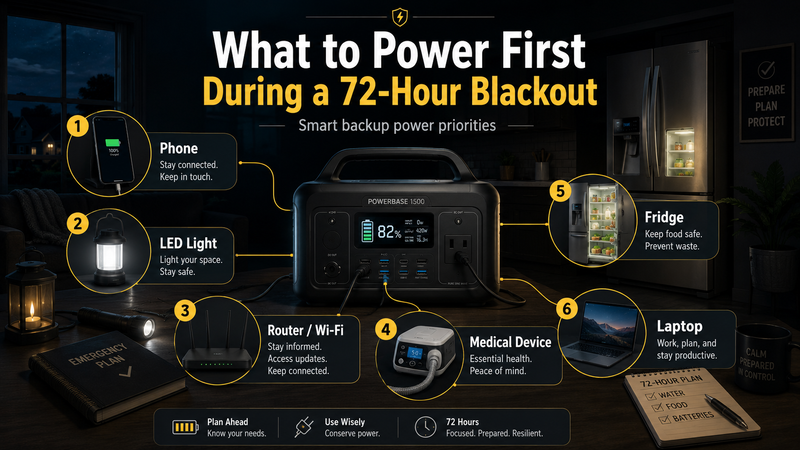
A blackout feels simple at first: the lights go out, the internet stops, and everyone starts looking for chargers, flashlights, and backup batteries. But after the first hour, the real question becomes more practical: what should you actually power first?
A 72-hour blackout plan is not about trying to keep your home running exactly as normal. That usually wastes energy too quickly. A better plan is to protect the things that matter most: communication, safety, basic comfort, food preservation, and essential work or health needs.
The goal is not to power everything. The goal is to power the right things in the right order.
Why the First 72 Hours Matter
The first three days of a blackout are important because they often determine whether the situation stays manageable or becomes stressful. During this period, you need to stay informed, keep phones charged, maintain basic lighting, preserve food if possible, and avoid wasting backup power on devices that are not truly necessary.
Many people make the same mistake during an outage. They use backup power too casually at the beginning, then realize later that they need it for something more important. A laptop, TV, gaming console, or large appliance can drain available energy much faster than expected.
A smarter approach is to divide your needs into priority levels.
Suggested intro before the embedded video:
A good blackout plan is not only about having backup power. It is about knowing what deserves power first. This video explains how portable power fits into a practical 72-hour home energy plan.
Priority 1: Communication Devices
Your phone should usually be the first device you protect during a blackout. It gives you access to emergency alerts, family communication, maps, banking apps, messaging, and local updates.
The most important devices in this category are:
smartphone;
power bank;
basic radio if you use one;
router or modem, if internet service is still available;
small backup hotspot, if you have one.
A phone does not need to stay at 100% all the time. During a longer outage, it is often better to keep it between a usable range instead of charging it constantly. Reduce screen brightness, turn off unnecessary apps, and use low-power mode.
If mobile networks become unstable, a charged phone still matters. You may need it later when signal returns.
Priority 2: Basic Lighting
Lighting is the next priority because it affects safety. Moving around in the dark increases the chance of accidents, especially in stairways, kitchens, bathrooms, garages, and outdoor areas.
The best blackout lighting setup is not a large bright lamp running all night. It is usually a mix of small, efficient lights placed where they matter most.
Useful options include:
rechargeable LED lanterns;
headlamps;
small USB lights;
motion lights for hallways;
low-power desk lamps.
Avoid using high-power decorative lighting or large lamps unless you have plenty of backup capacity. A few efficient LED lights can make a home feel much safer without draining your power station too quickly.
Priority 3: Internet and Router
If your internet provider is still operating during the outage, powering your router can be extremely useful. It allows you to work, message family, check updates, and avoid relying only on mobile data.
However, the router should not always run nonstop. If your backup power is limited, use it in planned sessions. For example, you can turn it on for 20–30 minutes every few hours to check messages, send updates, and download important information.
This is especially useful if multiple people in the home need to communicate or work online. A router usually uses much less energy than a laptop or large screen, so it can be a high-value device to power.
Priority 4: Medical or Essential Personal Devices
Any medical or essential personal device should move to the top of your priority list. This may include equipment for breathing support, refrigeration for certain medicines, mobility devices, or other health-related electronics.
This part of the plan depends on the household. For one person, the most important device may be a phone. For another, it may be a medical device that must run on a schedule.
The key is to identify these needs before a blackout happens. Do not wait until the lights go out to calculate how much power an essential device uses or how long your backup system can support it.
Priority 5: Refrigerator or Food Preservation
A refrigerator can be important, but it should be managed carefully. It uses much more energy than a phone, router, or LED light. During a blackout, the first rule is simple: do not keep opening the door.
A closed refrigerator can usually keep food cold for a limited time, while a freezer can often hold temperature longer if it stays closed. Instead of powering the refrigerator constantly, some households use backup power in intervals to help maintain temperature.
Food preservation becomes more important if the outage is long, the weather is hot, or you have expensive frozen food. But if your backup power is small, you may need to prioritize communication and safety first.
A practical approach is:
keep the refrigerator and freezer closed;
power the fridge only when needed;
use a thermometer if available;
move the most important food together;
avoid opening the door just to check.
Priority 6: Laptop and Work Devices
A laptop is useful during a blackout, especially if you work remotely, manage documents, or need access to important files. But it should not automatically become the first thing you charge.
If your phone can handle basic communication, save the laptop for tasks that truly need it. When you do use it, lower screen brightness, close heavy apps, and avoid unnecessary video streaming.
A laptop can be a good use of backup power when it helps you earn money, manage urgent work, or solve practical problems. It is a poor use of backup power if it is only being used for entertainment while your phone, lights, or router are running low.
What Not to Power First
Some devices feel comforting during a blackout, but they can quickly waste your limited energy. Unless you have a large backup system, avoid powering non-essential high-consumption devices early.
These may include:
large TVs;
gaming consoles;
desktop PCs;
electric heaters;
kettles;
microwaves;
hair dryers;
large speakers;
unnecessary decorative lights.
Heating and cooking devices are especially demanding. They can drain a battery system very quickly. For longer outages, it is better to have separate low-power or non-electric solutions for warmth, food, and hot drinks.
A Simple 72-Hour Power Priority Order
A practical blackout priority list may look like this:
Medical and essential personal devices
Phones and communication tools
Basic LED lighting
Router or hotspot
Refrigerator or food preservation
Laptop for necessary work
Comfort devices only if power remains
This order can change depending on your situation. For example, if you depend on refrigerated medicine, cooling becomes a higher priority. If you work remotely during emergencies, your router and laptop may matter more. If you have small children or elderly family members at home, lighting and communication may be more important than preserving frozen food.
The point is to make the decision before the blackout, not during it.
How Portable Power Changes the Plan
Portable power stations make blackout planning more flexible because they can power more than just a phone. Depending on capacity, they may support routers, laptops, lights, small appliances, and short refrigerator cycles.
But portable power does not remove the need for priorities. In fact, it makes planning more important. When you know what to power first, you can stretch your available energy much further.
A small power station might be enough for phones, lighting, and internet. A larger one may support a refrigerator, laptops, and more extended use. Solar panels can also help during longer outages, but only if weather, sunlight, and setup conditions allow it.
Final Thoughts
The best 72-hour blackout plan is not the one with the most gadgets. It is the one that protects your most important needs with the least wasted energy.
Start with communication. Add safe lighting. Keep internet available if possible. Protect essential medical or personal devices. Be careful with the refrigerator. Use laptops and comfort devices only when they serve a real purpose.
A blackout becomes much easier to manage when you already know what deserves power first.
Comments
No comments yet. Be the first to comment!