How to Start Building a Small Off-Grid Power Setup
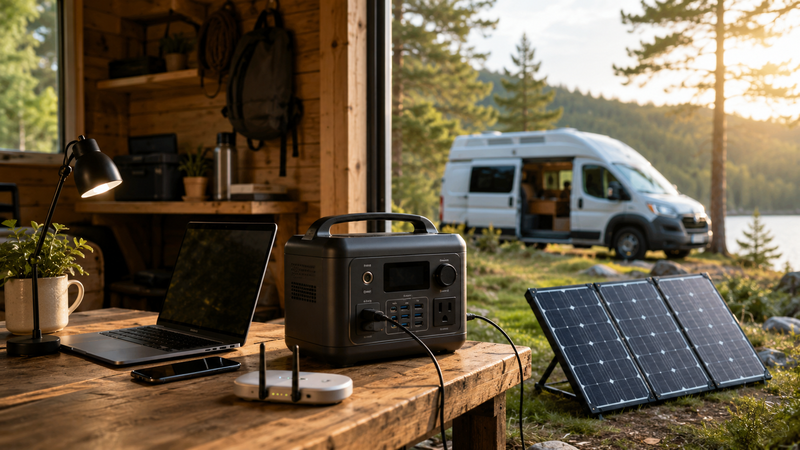
Building an off-grid power setup can sound complicated at first. People often imagine roof-mounted solar panels, large batteries, electrical panels, permits, and expensive equipment. That kind of system may make sense for a full-time off-grid home, but it is not the only way to begin.
For many people, the smarter starting point is much smaller. A basic setup can begin with one portable power station, a few essential devices, and a realistic understanding of how much power is actually needed. This is especially useful for a cabin, shed, camper, tiny workspace, weekend retreat, or backup corner in a regular home.
The goal is not to build a perfect energy system on day one. The goal is to create a simple setup that works, learn from real use, and expand only when the need becomes clear.
Start With the Devices, Not the Equipment
The biggest mistake beginners make is starting with the product first. They look at power stations, solar panels, battery sizes, and technical specs before they know what they actually need to run.
A better approach is to start with your devices.
Ask yourself what the small off-grid setup must support. For most beginner setups, the list is usually simple:
phone charging;
laptop charging;
Wi-Fi router or mobile hotspot;
LED lights;
camera or drone batteries;
small fan;
mini fridge or cooler;
basic tools;
emergency communication devices.
This list matters because every device has a different power demand. Charging a phone is easy. Running a fridge for many hours is more demanding. Using power tools may require higher output. A laptop and router may be realistic for a small setup, while heating, cooking, or air conditioning may quickly become too power-hungry.
The first step is not buying the biggest unit you can find. The first step is deciding what really needs power.
Think in Essential Loads
A small off-grid setup works best when it is built around essential loads. These are the devices that make the space useful, safe, or comfortable.
For example, a weekend cabin may only need lights, phones, a laptop, and a small cooler. A remote work shed may need a laptop, router, monitor, phone, and desk lamp. A camper setup may need lights, small appliances, charging ports, and maybe a compact fridge.
The more clearly you define the use case, the easier the setup becomes.
A useful beginner rule is this: power the things that help you communicate, work, see, and preserve essentials first. Everything else comes later.
That means the first priority is usually:
communication;
lighting;
work devices;
food or medicine storage;
small comfort devices.
This keeps the system practical. Instead of trying to recreate a full household grid, you create a focused power setup for the most important needs.
Why Portable Power Stations Are a Good Starting Point
Portable power stations are popular because they reduce the number of decisions a beginner has to make. Instead of building a battery system from separate parts, you get a ready-made unit with a battery, inverter, outlets, USB ports, display, and charging options in one box.
That does not make every model perfect. But it does make the first step much easier.
A portable power station can be useful because it is:
easy to move;
simple to charge;
safer and cleaner than fuel-based indoor options;
quiet during use;
flexible for home, travel, camping, and backup power;
expandable with solar panels in many cases.
Before building a full solar system, it helps to understand why portable power stations have become such a common starting point. A useful video on this trend is “Why Everyone Is Buying Portable Power Stations”:
For beginners, the value is not only the battery. The value is simplicity. You can test your real power needs without immediately committing to a large permanent setup.
Add Solar Only After You Understand Your Usage
Solar panels can make a small off-grid setup much stronger, but they should not be treated as magic. A solar panel does not create unlimited power. It depends on sunlight, panel size, weather, placement, and how efficiently the power station charges.
This is why it often makes sense to start with the power station first. Use it for a few days or weekends. Learn how quickly it drains. Notice which devices use more power than expected. Then decide whether solar charging is necessary.
Solar becomes more useful when:
you stay off-grid for more than one day;
you want to recharge during daylight;
you use the setup in a cabin, shed, camper, or outdoor workspace;
you want less dependence on wall charging;
you need emergency power during longer outages.
A small solar panel may be enough for light use. A larger panel setup may be needed for heavier daily demand. The important point is to match solar charging to real behavior, not just to product claims.
Build the Setup in Three Stages
A small off-grid power setup becomes easier when you build it in stages.
Stage 1: Basic Backup Power
This stage is about keeping small essentials running.
A simple setup may include:
one portable power station;
phone charging cables;
a laptop charger;
LED lights;
a small power strip if needed;
a clear list of priority devices.
This is enough for short outages, weekend use, light remote work, and basic emergency readiness. It is also the best stage for learning what your real needs are.
Stage 2: Solar Charging
Once you know your power station is useful, you can add solar.
This stage may include:
one compatible solar panel;
extension cable if needed;
safe outdoor placement;
a basic charging routine;
tracking how long it takes to recharge.
This turns the setup from stored backup power into a small renewable power loop. It is still limited, but it becomes much more useful for cabins, sheds, campers, and longer outages.
Stage 3: Better Energy Planning
After using the setup for a while, you can improve it.
This may include:
a larger power station;
extra solar panels;
more efficient lights;
lower-power appliances;
dedicated charging stations;
better cable management;
backup internet;
a written power priority plan.
At this stage, you are no longer guessing. You are improving the system based on real use.
Choose Low-Power Devices Whenever Possible
The easiest way to make a small off-grid setup better is not always buying a bigger battery. Sometimes the smarter move is reducing demand.
Efficient devices make the whole system last longer. LED lights use much less power than older lighting. A laptop may be easier to support than a desktop computer. A small efficient fan may be more realistic than a large appliance. A compact cooler may be easier to manage than a full-size refrigerator.
A small off-grid setup rewards efficiency.
Before upgrading the battery, look for ways to reduce unnecessary load:
use LED lighting;
charge devices during peak solar hours;
avoid powering devices you are not using;
use energy-efficient laptops and monitors;
keep backup devices fully charged;
avoid high-heat appliances when possible.
This approach makes the setup more reliable and less expensive.
Do Not Forget Internet and Communication
Power is only one part of modern off-grid usefulness. For many people, internet and communication matter just as much.
If the setup is for remote work, online learning, content creation, or emergency readiness, think about how you will stay connected. That may mean powering a Wi-Fi router, using a mobile hotspot, keeping a phone charged, or having a backup SIM card.
A good small setup should answer three questions:
How will I charge my phone?
How will I stay online if I need to?
How long can my router or hotspot stay powered?
For a remote cabin or shed, communication may be the difference between a useful workspace and an isolated room with lights.
Keep the Setup Simple and Visible
A backup power setup is only useful if people can use it quickly. If cables are scattered, chargers are missing, and nobody knows what to plug in first, the system becomes frustrating.
A simple setup should be easy to understand.
Keep the power station in a known location. Store the most important cables nearby. Label chargers if needed. Write a small priority list. Keep the unit charged before storms, trips, or planned off-grid weekends.
A practical priority list could look like this:
Phone.
Router or hotspot.
Laptop.
LED light.
Fridge or cooler, if needed.
Extra devices only after essentials are covered.
This kind of list prevents wasted battery time. It also makes the setup easier for family members or guests to use.
Test Before You Depend on It
A small off-grid setup should be tested before it becomes important. Do not wait for a blackout or a remote trip to find out that a cable is missing or the power station is too small.
Try a simple test at home.
Run your basic setup for a few hours. Plug in the laptop, router, phone, and light. Watch how the battery level changes. Then test solar charging if you have a panel. Notice how weather and placement affect charging speed.
Testing helps you discover practical details:
which devices drain power quickly;
which cables need to stay packed;
how long the battery really lasts;
whether the router works during an outage;
whether solar charging is fast enough;
whether the setup is easy to move.
Real testing is more useful than guessing from specs.
Final Thoughts
Starting a small off-grid power setup does not have to be overwhelming. You do not need to build a full solar system immediately. You can begin with a focused goal: keep essential devices powered when regular electricity is unavailable.
For many people, the best first step is a portable power station. It gives you a simple way to power phones, laptops, lights, routers, and other small essentials. After that, solar panels can turn the setup into something more flexible and independent.
The key is to start small, test honestly, and expand based on real needs. A good off-grid setup is not the one with the most equipment. It is the one that reliably powers what matters most.
Comments
No comments yet. Be the first to comment!