How Product Pages Become Heavy Over Time
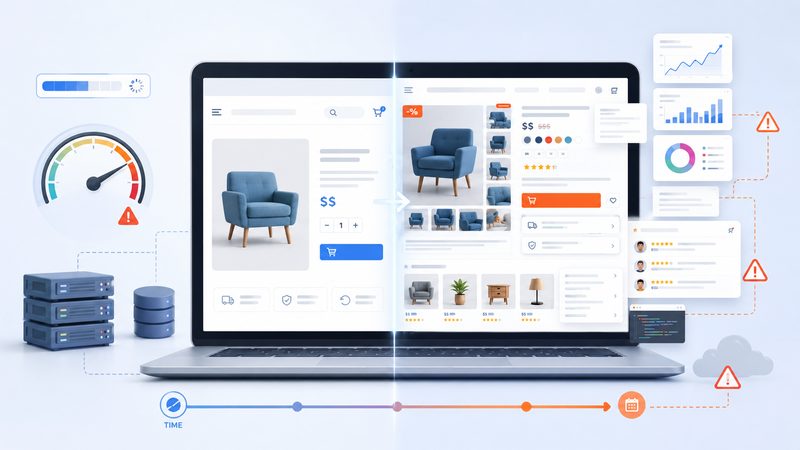
A WooCommerce product page often starts as a simple sales page. It shows the product name, images, price, short description, and an add-to-cart button. At that stage, the page may feel light because there are not many extra features around it.
But product pages rarely stay simple for long. As the store grows, the owner usually adds more images, more product details, more trust signals, more plugins, and more sales elements. Each addition may be useful, but together they can make the page heavier than expected.
This is why product-page performance matters. A slow product page can weaken the buying process before the visitor even reaches the cart or checkout.
Why product pages become more complex
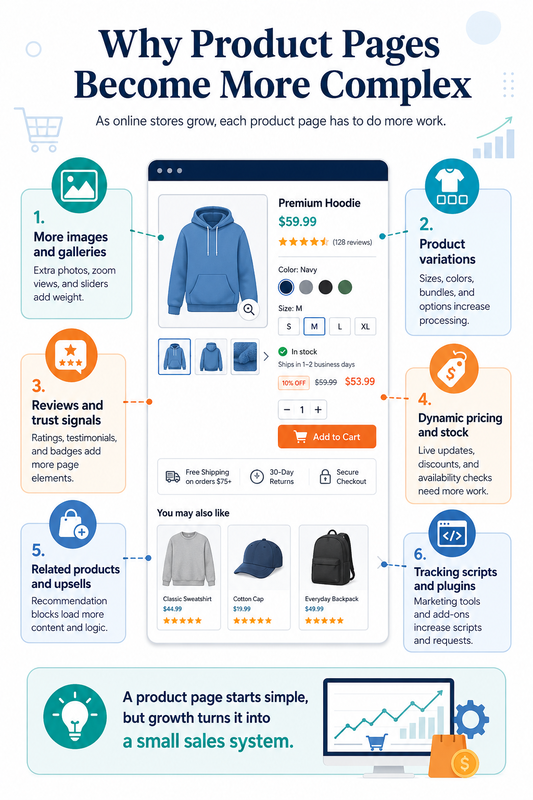
A product page is not just a content page. A blog post mostly needs to display text, images, and maybe a few links. A WooCommerce product page has to help the visitor understand the product, compare options, trust the store, and decide whether to buy.
That means the page often includes more moving parts. It may need to show product variations, stock status, shipping information, reviews, recommendations, discount rules, and dynamic price details. The visitor sees one page, but the website may be doing much more work behind the scenes.
Common elements that make product pages heavier include:
large image galleries;
product variations and attributes;
review and rating widgets;
related product sections;
stock and availability messages;
discount or membership logic;
shipping and delivery blocks;
analytics, pixels, and marketing scripts.
None of these elements are automatically bad. Many of them help the store sell more. The problem appears when too many of them are added without checking how they affect loading speed and server work.
The hidden cost of useful features
Most product-page features are added for good reasons. Better photos can increase trust. Reviews can reduce buyer hesitation. Related products can raise order value. Product variations can make the buying process easier.
But every useful feature still has a cost. It may add more scripts, more database queries, more design weight, or more processing. A single feature may not slow the page down much, but several small additions can create a noticeable problem.
This is one reason WooCommerce stores often become slower gradually. The store owner does not usually break the site with one big change. Instead, the product page becomes heavier after many small improvements.
The pattern often looks like this:
first, the page loads quickly enough;
then more plugins and sales blocks are added;
then product pages feel slower on mobile;
then variation changes or image galleries feel delayed;
then traffic growth makes the problem more visible.
By the time the issue becomes obvious, the page may already depend on many separate systems.
Why variations make pages heavier
Product variations are one of the most common reasons WooCommerce product pages become more demanding. A simple product may only need one price, one stock value, and one add-to-cart action. A variable product may need to handle different sizes, colors, models, bundles, or add-ons.
This creates more work before the customer buys. The page may need to prepare variation data, check availability, change prices, update images, and respond when the visitor selects different options. If the product has many combinations, this can make the page feel slower.
The issue becomes stronger when variations are combined with other features. For example, a product page with many variations, large images, dynamic discounts, reviews, upsells, and tracking scripts can become much heavier than it looks.
A clean design does not always mean a light page. The page may look simple, but the server and browser may still be handling many tasks at once.
Plugins can add pressure slowly
WooCommerce stores often rely on plugins because plugins solve real business problems. A store may need product filters, advanced reviews, custom checkout fields, bundles, subscriptions, coupons, shipping rules, or marketing tools. Each plugin may be useful on its own.
The problem is that plugins often add their own scripts, styles, database calls, or dynamic logic. Some plugins load assets on many pages, even when they are only needed in one place. Others add extra checks every time a product page loads.
This does not mean plugins should be avoided completely. A store without the right features may sell worse. But product pages should be reviewed regularly to see which plugins are truly helping sales and which ones are only adding weight.
A practical review should ask:
Does this feature help the visitor decide faster?
Is this plugin needed on every product page?
Does it load scripts that could be limited or removed?
Is the same function already handled by another tool?
Does the feature improve sales enough to justify its performance cost?
This kind of review helps keep the product page useful without letting it become overloaded.
Why hosting becomes part of the problem
Optimization can fix many product-page issues. Images can be compressed. Scripts can be reduced. Unnecessary plugins can be removed. Caching can help some parts of the site. A better theme can also make a difference.
But WooCommerce product pages often include dynamic elements that cannot always be handled like static pages. Prices, stock status, cart behavior, user sessions, and product rules may need live processing. This makes the hosting environment more important as the store grows.
Weak hosting may work when the store is small. It may also look acceptable when traffic is low. But when more visitors browse products at the same time, the server has to handle more work. That is when slow response times, delayed page loads, and unstable browsing can appear.
This is why hosting should be part of the wider WooCommerce performance decision. A deeper guide on choosing hosting for online stores is here:
https://volodymyrzh.medium.com/hosting-for-woocommerce-stores-how-to-choose-the-right-setup-for-speed-and-sales-bac7afd12358
Product pages affect checkout before checkout begins
Checkout is usually the most sensitive part of a WooCommerce store. It needs to process carts, customer data, payment steps, shipping rules, taxes, coupons, and order creation. But the product page can create the problem earlier.
If the product page feels slow, fewer visitors add products to the cart. If image galleries lag, buyers may lose interest. If variations respond slowly, the store may feel unreliable. If mobile browsing is weak, ad traffic becomes less efficient.
A slow product page can reduce sales before the checkout page gets a chance to convert.
This connects directly with the previous Fika article about WooCommerce checkout performance:
https://digitalowl.fika.bar/why-woocommerce-checkout-is-harder-to-optimize-01KS35HKDJX0A7116SF6BS9JE8
The buying journey should feel smooth before checkout begins. Product pages need to support confidence, not create friction.
What store owners should review
A better product page is not always a smaller product page. Removing every feature can make the page faster, but it can also make it less persuasive. The goal is to keep the elements that help buyers and reduce the ones that only add noise.
Store owners should review product pages as business assets, not just design assets. A product page needs to load well, explain clearly, support trust, and move the visitor toward action. Speed and conversion should work together.
Useful things to review include:
image size and gallery behavior;
number of active product-page plugins;
variation complexity;
review and upsell widgets;
scripts loaded by tracking tools;
mobile loading experience;
server response under traffic;
database load from WooCommerce features.
This review becomes more important as the store grows. A setup that worked for 20 products may not work the same way for 500 products. A page that felt fine with low traffic may become weak during campaigns or seasonal demand.
When heavy product pages become a warning sign
A heavy product page does not always mean the store needs a complete rebuild. Sometimes the problem can be fixed with image optimization, cleaner plugins, better caching, or theme improvements. But repeated slowdowns are a warning sign.
If product pages are consistently slower than normal content pages, if mobile visitors leave quickly, if variation selection feels delayed, or if traffic spikes make the store unstable, the issue may be bigger than design. The store may need stronger hosting, better database performance, and a cleaner technical setup.
The key is to look at the pattern. One slow page may be an isolated issue. Many slow product pages across the store usually point to a system problem.
WooCommerce product pages become heavy over time because the store becomes more serious. More products, more options, more sales tools, and more traffic all create more work. That growth is normal, but the technical setup has to grow with it.
Comments
No comments yet. Be the first to comment!