How Much Electricity Does a Home Wi-Fi Setup Use in 24 Hours?
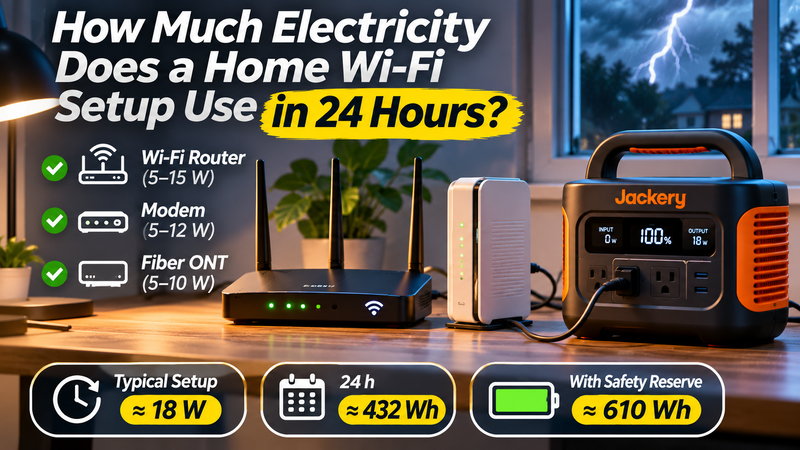
Your Wi-Fi router probably uses less electricity than almost any major appliance in your home. But during a power outage, even a small device running continuously can become an important part of your backup battery budget.
A typical home internet connection may require a router, modem, or fiber-optic terminal. Each device consumes electricity, and keeping your internet equipment running for 24 hours requires more energy than its wattage rating alone might suggest.
Fortunately, most home networking setups are relatively energy-efficient. With a few simple calculations, you can estimate how much electricity your equipment uses, determine the battery capacity needed for a full day, and avoid buying an unnecessarily large backup system.
1. How Much Power Does a Wi-Fi Router Consume?
A typical home Wi-Fi router may consume approximately 5–15 watts during operation, although actual consumption varies with the model, wireless activity, and connected features.
For example:
5W router: 120Wh over 24 hours.
10W router: 240Wh over 24 hours.
15W router: 360Wh over 24 hours.
The calculation is straightforward:
Energy (Wh) = Power (W) × Time (hours)
A router averaging 10W consumes:
10W × 24 hours = 240Wh per day
That's only 0.24 kilowatt-hours (kWh), but it represents continuous electricity demand.
During a brief outage, this may be insignificant. During a multi-day interruption, the energy requirement accumulates.
Remember that a router's power adapter rating indicates its maximum supported output, not necessarily its actual continuous electricity consumption.
For more accurate planning, measure the device with a compatible power meter.
2. Don't Forget Your Modem or Fiber ONT
One common backup planning mistake is calculating electricity consumption for the Wi-Fi router while ignoring the equipment that connects it to the internet provider.
Your home network may include:
Wi-Fi router: Distributes your internet connection wirelessly.
Cable or DSL modem: Communicates with your internet provider.
Optical Network Terminal (ONT): Connects a fiber-optic service to your home network.
Combined gateway: Integrates a modem and router into one device.
Not every home requires all these components.
For example, a fiber connection may use an ONT and separate router, while a cable internet connection may require a modem and router. Some providers supply a single combined device.
Example: Router Plus Fiber ONT
Let's assume:
Wi-Fi router: 10W.
Fiber ONT: 8W.
Combined continuous power:
10W + 8W = 18W
Daily energy consumption:
18W × 24 hours = 432Wh
Over three days:
432Wh × 3 = 1,296Wh
This illustrates why a seemingly small networking setup can require substantial stored energy during an extended outage.
3. Three Realistic Home Internet Power Scenarios
The easiest way to estimate backup requirements is to consider three hypothetical setups.
Scenario A: Low-Power Home Network
Imagine an efficient router and compatible fiber terminal drawing a combined 12W.
Continuous power: 12W.
Energy for 8 hours: 96Wh.
Energy for 24 hours: 288Wh.
Energy for 48 hours: 576Wh.
This configuration is relatively easy to support using a suitably sized backup battery.
Scenario B: Typical Router and ONT
Now consider the 18W combination from our earlier example.
Continuous power: 18W.
Energy for 8 hours: 144Wh.
Energy for 24 hours: 432Wh.
Energy for 48 hours: 864Wh.
This scenario demonstrates why a small battery designed for brief interruptions may not be sufficient for an entire day.
Scenario C: Higher-Power Network Equipment
A more demanding setup might include a router, modem, and additional networking equipment consuming 25W in total.
Continuous power: 25W.
Energy for 8 hours: 200Wh.
Energy for 24 hours: 600Wh.
Energy for 48 hours: 1,200Wh.
The difference between 12W and 25W may seem small, but over 48 hours it represents an additional 624Wh.
The most important variable is your actual combined continuous power consumption—not simply the number of devices connected to Wi-Fi.
All three scenarios are illustrative. Your equipment may consume more or less electricity.
4. How Much Backup Battery Capacity Do You Need?
The electricity consumed by networking equipment isn't necessarily identical to the energy drawn from a backup battery.
Portable power stations and UPS systems introduce conversion losses and sometimes consume electricity even when their connected loads are small.
Account for Electrical Losses
For a simplified example, assume the backup system delivers 85% of nominal battery energy to the connected equipment.
This is a planning assumption, not a universal efficiency rating.
For our 18W network:
432Wh ÷ 0.85 ≈ 508Wh
Adding a 20% planning reserve:
508Wh × 1.20 ≈ 610Wh
Under these assumptions, a battery with approximately 600–650Wh of nominal capacity could be a reasonable starting point for planning 24 hours of operation.
Now compare our three scenarios:
12W network: Approximately 407Wh of nominal capacity with the same efficiency and reserve assumptions.
18W network: Approximately 610Wh.
25W network: Approximately 847Wh.
These figures are estimates, not guaranteed runtime specifications. Actual usable energy depends on battery design, conversion efficiency, standby losses, and operating conditions.
Some backup devices are especially inefficient when operating very small loads through an AC inverter. This can make their real-world performance noticeably different from a simplified calculation.
Can a 1000Wh Power Station Run Wi-Fi for 24 Hours?
For many modest home internet setups, a 1000Wh-class power station may provide enough energy for a complete day.
However, its actual runtime depends on the networking load, output configuration, and internal power consumption.
A station used only for a 10W router may behave differently from the same station powering several devices through its AC outlets.
If you're comparing power stations for a complete home office—including laptops, routers, and other essential equipment—this detailed guide explains how to select an appropriate backup size:
Best Jackery for Home Office and Wi-Fi Backup: Which Power Station Should You Choose?
For a router-only setup, a smaller compatible backup solution may be more practical than a large portable power station.
5. AC vs DC Power: Can You Reduce Energy Losses?
Most routers and fiber terminals operate internally on DC electricity, even when connected to a normal household wall outlet.
Their power adapters convert AC electricity into the voltage required by the device.
When using a battery backup, several conversions may occur:
The battery stores DC energy.
An inverter converts DC into AC.
The router's adapter converts AC back into DC.
Each conversion can introduce losses.
Would Direct DC Power Be More Efficient?
Potentially, yes.
A compatible DC backup system may avoid the need to operate an AC inverter continuously.
However, electrical compatibility is essential.
Before using a DC output, verify:
Required operating voltage.
Maximum current demand.
Connector dimensions.
Connector polarity.
Supported power delivery method.
A device designed for 12V should not be connected to an incompatible output simply because the connector appears to fit.
USB-powered routers also require suitable voltage negotiation or conversion equipment.
Never improvise electrical connections to save a small amount of energy. Use manufacturer-approved or explicitly compatible power supplies.
6. Can a UPS Keep Your Internet Running All Day?
An uninterruptible power supply can maintain electricity during a brief interruption, but not every UPS is designed for long-duration backup.
Many consumer models prioritize rapid power transfer and safe equipment shutdown rather than extended runtime.
When choosing between a UPS and a larger battery system, consider:
Battery capacity in Wh.
Actual runtime at low loads.
Power transfer behavior.
Output compatibility.
Standby consumption.
Battery replacement options.
A compact DC UPS designed for networking equipment may be efficient for certain router and ONT combinations.
A larger portable power station may be more useful when you also want to operate laptops, lighting, and other devices.
The best solution depends on whether your goal is uninterrupted connectivity for a few minutes or several hours of operation without grid power.
7. Why Battery Backup Doesn't Guarantee Internet Access
There's an important limitation that electricity calculations cannot solve.
A powered Wi-Fi router doesn't necessarily mean you have a working internet connection.
During a widespread power outage, your internet provider may experience failures affecting:
Local networking equipment.
Fiber or cable infrastructure.
Distribution facilities.
Upstream connections.
Backup power at provider-operated sites.
Your router may continue broadcasting Wi-Fi even when the provider's internet service is unavailable.
Prepare a Second Communication Option
Consider maintaining:
A charged smartphone with hotspot capability.
An alternative mobile network where practical.
Offline copies of essential documents.
Important contact information saved locally.
A battery-powered radio for emergency information where appropriate.
Cellular networks may also experience outages or congestion.
If you depend on internet access for remote work, test both your home connection backup and your alternative communication method.
8. How to Reduce Your Network's Daily Power Consumption
Before buying a larger backup battery, check whether you can reduce the equipment that needs electricity.
Some useful adjustments include:
Disconnect unnecessary networking accessories.
Switch off unused network switches or access points.
Avoid keeping additional routers powered without a clear purpose.
Use efficient, compatible networking equipment.
Consider direct DC backup where safely supported.
Measure actual energy use instead of relying on adapter ratings.
For example, reducing continuous network power consumption from 25W to 18W saves:
7W × 24 hours = 168Wh per day
Over three days, that's 504Wh of electricity you no longer need to supply.
This can make a meaningful difference when working with a limited battery capacity.
Final Thoughts: How Much Electricity Does Wi-Fi Really Need?
Most home internet equipment uses relatively little power at any given moment. But keeping it running continuously for 24–48 hours requires careful energy planning.
For illustration:
A 12W network consumes 288Wh daily.
An 18W network consumes 432Wh daily.
A 25W network consumes 600Wh daily.
Your actual electricity requirement depends on the router, modem or ONT, and any additional equipment.
Once you know the combined power consumption, you can calculate the energy required for your preferred backup duration and include an allowance for losses.
The smartest Wi-Fi backup isn't necessarily the largest battery. It's the smallest reliable, compatible system that meets your real energy and connectivity needs.
And remember: maintaining electricity for your networking equipment is only one part of internet resilience. The provider's network must remain operational too.
Disclaimer
This article is provided for informational and educational purposes. Power consumption examples, battery capacity estimates, and runtime calculations are approximate and may differ under real operating conditions. Verify actual equipment requirements, electrical compatibility, and manufacturer safety instructions before connecting backup power.
The linked buying guide may contain affiliate links. This article does not include direct affiliate product links.
Comments
No comments yet. Be the first to comment!