Why Website Performance Problems Often Start at the Hosting Layer
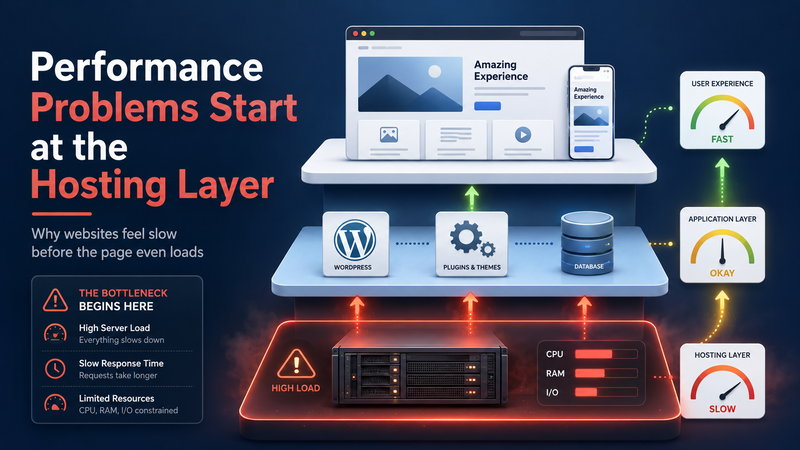
Website performance problems are often blamed on the visible parts of a site first. The theme looks heavy. The homepage has too many images. A plugin seems suspicious. A script from analytics or chat support appears in the waterfall report. All of these things can matter, but they do not always explain the deeper reason a website feels slow, unstable, or difficult to improve.
Many performance problems begin lower in the stack, at the hosting layer. This does not mean hosting is the only factor. A poorly built website can still be slow on a good server. But when the hosting environment is weak, limited, overcrowded, or badly matched to the website’s workload, every other optimization has less room to work.
In the previous article, I explained how cheap hosting can waste good traffic:
https://digitalowl.fika.bar/how-cheap-hosting-can-waste-good-traffic-01KSX8SP8455CBWJTJ82EB0H1Z
This article looks at the earlier step: why hosting often becomes the place where performance problems quietly start.
Hosting is not just storage for website files
A common mistake is thinking about hosting as a place where a website “lives.” That sounds simple, but it hides the real job hosting does. A hosting server is not only storing files. It also has to process requests, run PHP, communicate with the database, serve assets, handle traffic spikes, and respond quickly enough that the browser can start building the page.
For a small static website, this may not feel complicated. But most WordPress websites are not just static pages. They usually depend on themes, plugins, database queries, forms, admin actions, tracking scripts, caching rules, image processing, security checks, redirects, and sometimes WooCommerce logic.
That means hosting becomes part of the page-building process. If the server is slow to respond, limited in CPU, short on memory, or overloaded by other websites, the visitor may feel the delay before the page even begins to load properly.
The first delay often happens before the browser can help
Many website owners focus on what the browser downloads: images, CSS, JavaScript, fonts, and third-party scripts. Those things matter, but the browser cannot do much until the server sends the first meaningful response.
This is why the hosting layer is so important. If the server takes too long to prepare the page, the visitor waits before visual loading even begins. From the user’s point of view, nothing useful is happening. The screen may stay blank, the page may feel frozen, or the first visible content may arrive too late.
Several hosting-level factors can create this early delay:
slow server response time;
overloaded shared hosting resources;
limited CPU or memory;
slow database performance;
weak caching configuration;
too many websites sharing the same server environment.
The tricky part is that this kind of delay is not always obvious from the design of the website. A page may look clean and simple but still depend on a server that struggles behind the scenes.
Cheap hosting can hide limits until the site grows
Cheap hosting often works well enough when a site is small, has low traffic, and uses simple pages. That is why the problem is easy to miss at first. The website launches, loads acceptably, and the hosting bill stays low. Nothing feels urgent.
The limits usually appear later. The site gets more content. More plugins are added. More forms, tracking tools, popups, product pages, or landing pages appear. Traffic becomes less predictable. Search traffic, paid traffic, social clicks, and returning visitors start to create more simultaneous requests.
At that point, the same hosting setup may begin to show signs of pressure. Pages may load unevenly. The admin area may become slower. Checkout may feel fragile. Cached pages may seem fine, while dynamic pages struggle. A page may test well one moment and feel slow the next.
This is one reason cheap hosting can become expensive over time. The cost is not only the monthly hosting price. The larger cost may appear as lost leads, weaker conversion rates, wasted traffic, technical troubleshooting, and time spent trying to optimize symptoms instead of the cause.
The deeper breakdown is here:
https://volodymyrzh.medium.com/why-cheap-hosting-becomes-expensive-over-time-e08193b9387c
Optimization cannot fully fix a weak foundation
Optimization is still important. Images should be compressed. Unnecessary scripts should be removed. Caching should be configured. Themes and plugins should be reviewed. A website should not rely on better hosting to cover poor technical decisions.
But optimization has limits when the foundation is weak.
If the server is slow at processing requests, reducing image size will not fully solve the problem. If the database is slow, removing one small script may not change much. If CPU limits are being hit, the website may still feel unstable even after basic speed work. If shared hosting is crowded, performance may depend on what other websites on the same server are doing.
This is why some websites feel “optimized” but still slow. The visible checklist is completed, but the server still struggles with the actual workload.
A practical way to think about it is simple: front-end optimization reduces the weight of the page, but hosting determines how well the site can prepare and deliver that page under real conditions.
Dynamic pages expose hosting problems faster
Some pages are easier to cache than others. A simple blog post can often be served quickly once caching is configured. But not every page behaves this way.
Dynamic pages need more live processing. Examples include:
WooCommerce cart and checkout pages;
logged-in user areas;
search result pages;
filtered product listings;
forms and booking flows;
personalized or location-based pages.
These pages often need fresh data from the database. They may check user status, stock availability, shipping rules, coupons, form inputs, session data, or plugin logic. Because they cannot always be served as a simple cached copy, they reveal hosting limitations more quickly.
This is why a website owner may say, “The homepage is fast, but checkout is slow,” or “The public site is fine, but the admin panel is painful.” Those are often signs that the hosting layer is being tested by real processing work, not just static page delivery.
Performance problems are often mixed, not isolated
It is rarely accurate to say, “The problem is only hosting,” or “The problem is only plugins.” Website performance usually comes from a combination of layers.
A slow page may involve:
a heavy theme;
too many plugins;
large images;
third-party scripts;
database queries;
weak caching;
limited hosting resources.
The important point is that hosting affects how much pressure the website can absorb. A well-built site on weak hosting may still struggle. A messy site on strong hosting may still be wasteful. But when both the site and hosting are poorly matched, performance problems become much harder to control.
That is why the hosting layer should be part of diagnosis early, not only after everything else has failed.
How to recognize a hosting-layer problem
Hosting-related performance issues often appear as patterns rather than one obvious error. The site may not be slow every second of the day. Instead, it may become slow during traffic peaks, admin work, product updates, campaigns, or checkout activity.
Some warning signs include:
pages load inconsistently;
server response time is often high;
the admin dashboard feels slow;
uncached pages perform much worse than cached pages;
speed drops during traffic spikes;
checkout, forms, or search pages feel fragile;
optimization improves scores but not real user experience.
These signs do not prove hosting is the only problem. But they are strong reasons to investigate the server environment, resource limits, caching setup, and database performance.
The right question is not only “Is this hosting cheap?”
Low price is not automatically bad. Some affordable hosting plans are reasonable for small websites, early blogs, test projects, and simple pages. The problem begins when the hosting plan is cheaper than the workload it is expected to handle.
A better question is: does this hosting match what the website is actually doing?
A simple brochure website has different needs from a content-heavy WordPress site. A blog with occasional traffic has different needs from a WooCommerce store. A landing page receiving paid traffic has different needs from a small personal site. A website with dynamic pages, forms, checkout, plugins, and traffic growth needs hosting that can support real processing, not just file storage.
The hosting layer should match the business role of the website. If the site is expected to generate leads, sales, bookings, or revenue, then performance is not a technical luxury. It is part of the conversion path.
Conclusion
Website performance problems often start at the hosting layer because hosting controls the first response, server processing, database access, resource availability, and stability under load. Themes, plugins, images, and scripts still matter, but they operate on top of the server environment.
When hosting is too limited, every other part of the website has less room to perform well. Optimization may help, but it may not remove the deeper bottleneck. This is especially true for WordPress websites, WooCommerce stores, dynamic pages, and sites that depend on traffic for leads or sales.
The real issue is not whether hosting is cheap or expensive. The issue is whether the hosting setup is strong enough for the website’s current workload and future growth.
Comments
No comments yet. Be the first to comment!